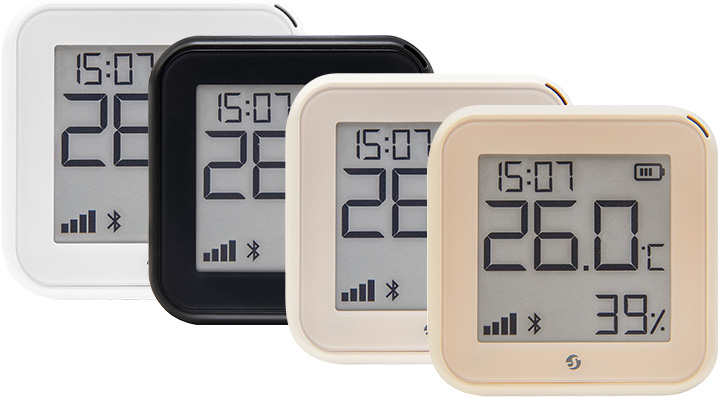
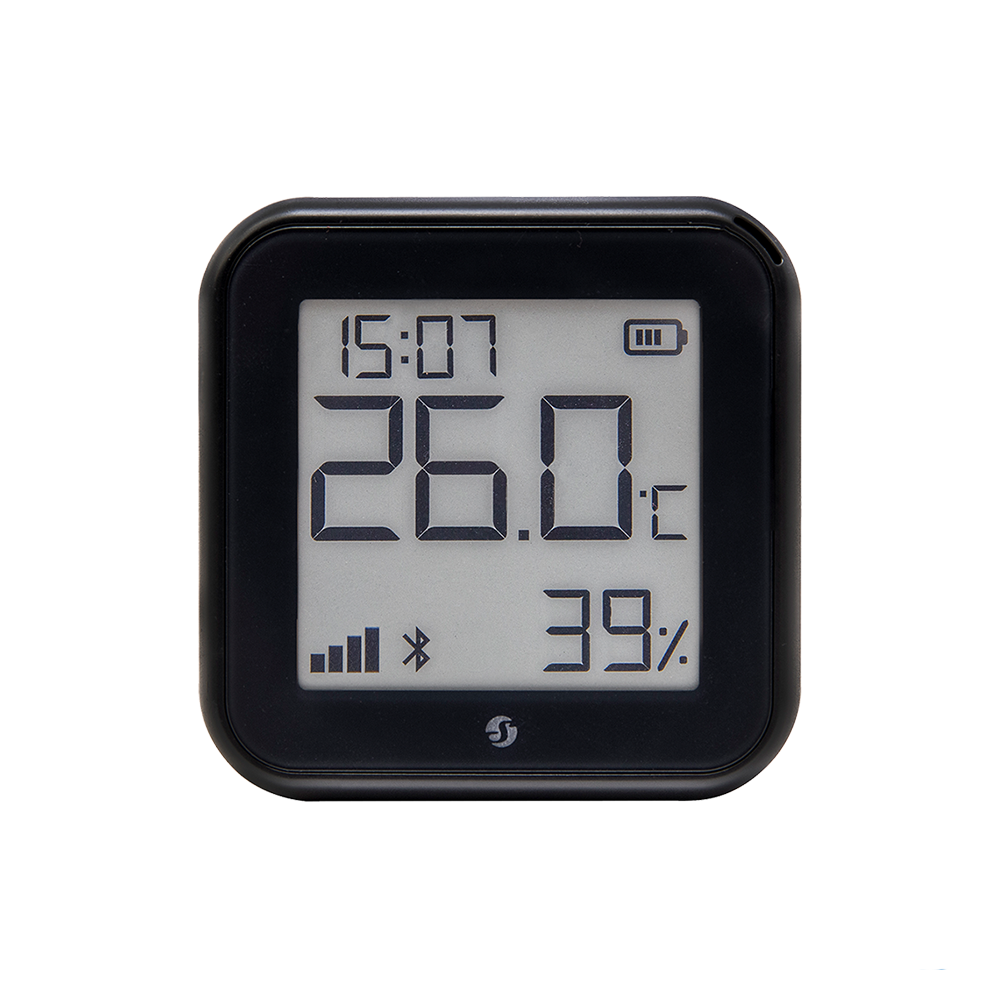
Next-generation Wi-Fi temperature & humidity sensor with an e-paper display. Enhanced with our 8MB Shelly chip, it’s equipped with all Gen3 device features.
3
3 Years Warranty
3 Years Warranty
This warranty covers any issues with the hardware or firmware that exist at the time of purchase or that appear within the warranty period. The warranty includes all parts of the hardware, such as the body, mechanics, and display (if applicable). However, it does not cover consumable items like batteries or accessories, as their lifespan depends on how much they are used.
No hub required! Easy control through the Shelly Smart Control app, as well as various protocols, platforms, and voice assistants
Equipped with the new Shelly chip: 8MB of memory and faster responsiveness
Enhanced with a low a consuming e-paper display & built-in clock
Works with type-C USB slot (for faster connection)
Batteries 4 x 1.5 V AA (LR) batteries (not included)
Low battery consumption (Up to 1-year life of the batteries)
Wall mountable
Has an embedded web server and connects to your Wi-Fi network
Shelly H&T Gen3
Device identification
Device name: Shelly H&T Gen3
Device model: S3SN-0U12A
Device SSID: ShellyHTG3-XXXXXXXXXXXX
Device Bluetooth ID: 0x1809
Short description
Shelly H&T Gen3 (the Device) is a Wi-Fi smart humidity and temperature sensor, featuring a large e-paper graphic display.
Main features
Wi-Fi Connectivity: The device can connect to your home Wi-Fi network, allowing you to remotely monitor humidity and temperature data through a smartphone app or other compatible devices.
Large E-Paper Graphic Display: It features a large e-paper graphic display that provides clear and easy-to-read humidity and temperature information.
Digital clock: NTP-synchronized real-time clock.
Integration with Smart Home Platforms: You can integrate the Shelly H&T Gen3 with popular smart home platforms, including Google, Alexa, and Samsung SmartThings. This enables voice control and automation capabilities through these platforms.
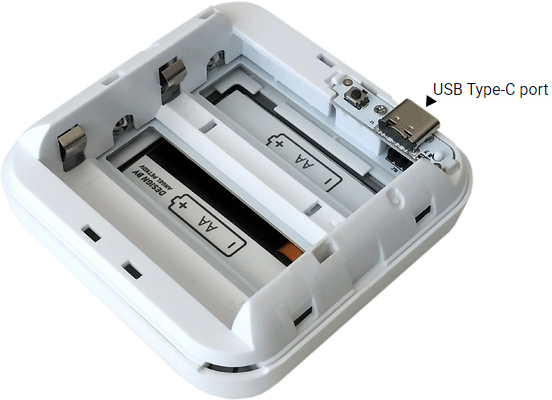
USB Type-C Port: It includes a USB Type-C port for powering the device. While it cannot be used to charge the device's batteries, it allows for continuous power through a USB connection.
Bluetooth Connectivity: Bluetooth is available for inclusion purposes, which may be useful during the setup process.
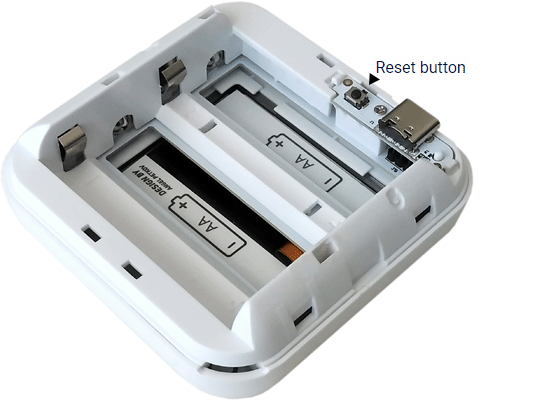
User-Friendly Interface: The device provides a user-friendly interface with a reset button for manual interactions.
Battery Operation: When running on batteries, the device wakes up at set intervals to take measurements of humidity and temperature. It reports changes in data based on predefined thresholds and unconditionally reports its status to the cloud if no reports are made within a specified time.
USB-Powered Operation: When powered via its USB port, the device wakes up more frequently, performs measurements, updates its display, and unconditionally reports data to connected channels.
Environmental Specifications: The device is designed for use in various environments, with an operational temperature range of 0°C to 40°C (32°F to 105°F) and a recommended humidity range of 30% to 70% RH.
Power Supply Options: It can be powered by 4 AA batteries (not included) or a USB Type-C connection.
Wireless Connectivity: The device supports Wi-Fi (802.11 b/g/n) and Bluetooth 4.2 protocols with specified indoor and outdoor range capabilities.
MCU (Microcontroller Unit): The device is equipped with an ESP-Shelly-C38F with 8 MB of flash memory.
These features make the Shelly H&T Gen3 a versatile and convenient device for monitoring humidity and temperature in residential, multi-dwelling units, light commercial, university/college, and other settings, with the added benefits of smart home integration and ease of use.
Main applications
Residential
MDU (Multi Dwelling Units - apartments, condominiums, hotels, etc.)
Light commercial (small office buildings, small retail/restaurant/gas station, etc.)
University/college
Integrations
Amazon Alexa supported capabilities
Yes
Google Smart Home supported traits
Yes
Samsung SmartThings supported capabilities
Yes
Device electrical interfaces
USB Type-C port
To supply power to the Device.
Cannot be used to charge batteries inside the Device.
Connectivity
Wi-Fi
Bluetooth
User interface
Inputs
Reset button (behind the back cover)
Reset button actions
Press briefly:
If the Device is in Sleep mode, puts it in Setup mode.
If the Device is in Setup mode, puts it in Sleep mode.
Press and hold for 5 sec:
If the Device is in Setup mode, enables its access point.
Press and hold for 10 sec:
If the Device is in Setup mode, factory resets the Device.
Outputs
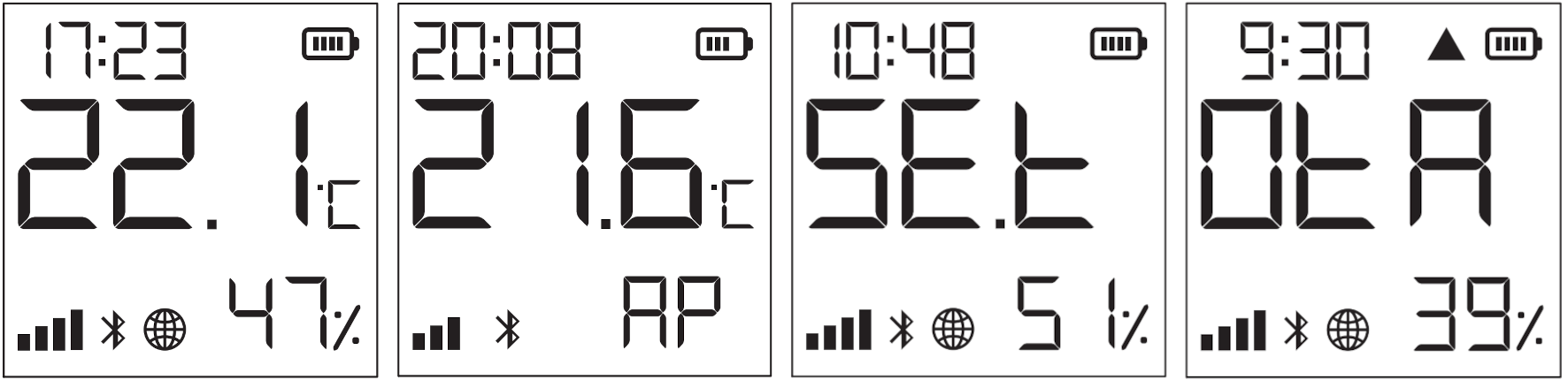
E-paper graphic display
Current time
The Device is in Setup mode.
The Device access point is enabled.
Humidity readings
The Device is receiving over-the-air update. Shows the progress as a percentage instead of the humidity.
The Device has reported current readings to the Cloud. If missing, the current readings on the display are not yet reported. In this case, the readings on the display may differ from the ones in the Cloud.
Wi-Fi signal strength indicator
Indicates battery level. Shows an empty battery when only USB powered.
Bluetooth connectivity is enabled.
Error while updating the Device firmware
Measuring and reporting
On batteries
When running on batteries the Device behaves as follows:
Wakes up every minute to do a measurement. If there is a 0.2 °C temperature or 3% humidity difference the screen updates. The default threshold for reporting is a change of 0.5 °C or 5%. If the change is less there will be no report sent.
If for two hours there is no report based on threshold values, the Device unconditionally (disregarding threshold values) reports its status to Shelly Cloud and other connected channels.
Due to self-heating a cool down period of 5 minutes is imposed. During this period the Device would not wake up at all.
On USB power supply
If powered via its USB port the Device will wake up every 5 minutes, perform a measurement, update its screen, unconditionally report to all connected channels, and sleep for 5 minutes.
User initiated report
If the user presses the Reset button (behind the cover) the Device will wake up, perform a measurement, update its screen, unconditionally report to all connected channels, and sleep for 5 minutes.
Specifications
Quantity
Value
Physical
Size (HxWxD):
70x70x26 mm / 2.76x2.76x1.02 inch (without stand) 70x70x45 mm / 2.76x2.76x1.77 inch (with stand)
Weight:
47 g / 1.66 oz
Mounting:
With stand (on a horizontal surface) Wall mounting (using screws with head diameter 5-7 mm / 0.20-0.28 inch and max 3 mm / 0.12 inch thread diameter or double sided foam sticker)
Shell material:
Plastic
Shell color:
White
Mocha: C:0 M:12 Y:28 K:12
Ivory: C:3 M:4 Y:14 K:8
Black: C:0 M:0 Y:0 K:100
Environmental
Ambient working temperature:
0 °C to 40 °C / 32 °F to 105 °F
Humidity:
30 % to 70 % RH
Max. altitude:
2000 m / 6562 ft
Electrical
Power supply:
Batteries
Battery type:
4 AA (LR6) 1.5 V (not included)
Estimated battery life:
approx. 1 year (depending on batteries used, temperature and humidity changes, and network connection strength)
Power supply, USB
Type-C (power adapter and cable not included)
Sensors, meters
Internal-temperature sensor:
No
Temperature sensor:
Yes
Humidity sensor:
Yes
Radio
Wi-Fi
Protocol:
802.11 b/g/n
RF band:
2401 - 2495 МHz
Max. RF power:
< 20 dBm
Range:
Up to 30 m / 100 ft indoors and 50 m / 160 ft outdoors (Depends on local conditions)
Bluetooth
Protocol:
4.2
RF band:
2400 - 2483.5 MHz
Max. RF power:
< 4 dBm
Range:
Up to 10 m / 33 ft indoors and 30 m / 100 ft outdoors (Depends on local conditions)
Can I use the Shelly Bulbs with my regular wall switch?
Yes. You can turn the bulb on/off using your wall switch. For remote/smart features, the switch must stay ON so the bulb remains powered.
Is the bulb dimmable?
Yes, you can smoothly dim or brighten the bulb from the Shelly app, voice assistants, or compatible smart home systems. Physical wall dimmers are not supported and may cause flicker or malfunction.
How do I connect the Shelly Bulb to my Wi-Fi?
Screw in the bulb and power it on. Use the Shelly app to add a new device—it will guide you through the pairing process. If the bulb’s not discoverable, turn it on/off 5 times quickly to reset.
Can I control the device via Bluetooth?
No, the protocol is used only for device inclusion, allowing for quick and easy setup through the Shelly Smart Control app.
For bluetooth control it is required to have another Bluetooth device such as Shelly BLU Button or Shelly BLU Motion to interact.
Additionally, Shelly devices can function as a BLE gateway, bridging Shelly BLU devices to your Wi-Fi network.
Is it possible to use the device without a hub?
Yes, Shelly devices (except for Wave devices) operate independently without the need for a hub. They connect directly to your Wi-Fi network, and you can control them via the Shelly Smart Control app, web interface, or through integrations with platforms like Google Home, Alexa, Home Assistant and Samsung SmartThings.
Is it possible to adjust the status update period?
The status update period is pre-set for optimal performance. For Shelly H&T, it's configured to update every 12 hours; for Shelly Plus H&T and Shelly H&T Gen3 it's set to every 2 hours when operating on battery. However, even with these settings, the device remains responsive to configured temperature or humidity thresholds.
How does Shelly H&T Gen3 operate on battery vs. USB power?
Battery-powered mode:
- Wakes up every minute to take measurements.
- Updates the display if there's a temperature change of ≥0.2°C or humidity change of ≥3%.
- Sends data reports if changes exceed 0.5°C or 5% humidity.
- If no significant changes occur, it sends an unconditional report every 2 hours.
- Imposes a 5-minute cooldown period to prevent self-heating.
USB-powered mode:
- Wakes up every 5 minutes to take measurements.
- Updates the display and sends data reports unconditionally every 5 minutes.
How do I reset Shelly H&T Gen3?
Short press: Toggles between Sleep and Setup modes.
Press and hold for 5 seconds: Enables the device's access point (AP) mode.
Press and hold for 10 seconds: Performs a factory reset.
The reset button is located behind the back cover of the device.
How do I connect Shelly H&T Gen3 to Wi-Fi?
Access Point Mode:
Press the reset button briefly to enable AP mode.
Connect to the device's Wi-Fi network (e.g., "ShellyHTG3-XXXXXX").
Open a browser and navigate to
Wi-Fi Configuration:
In the web interface, go to Settings > Wi-Fi.
Enter your Wi-Fi credentials and connect the device to your network
Discover the power of enhanced memory with Shelly H&T Gen3. Equipped with our Shelly chip featuring 8MB of memory, it doubles the efficiency and responsiveness. The leap in memory capacity prepares Gen3 devices for upcoming features, and provides smoother operation and quicker responses, ensuring your environment is monitored with unparalleled precision and ease.
Wi-Fi Operated
Connect Shelly H&T Gen3 to your Wi-Fi network. No HUB required!
Bluetooth
Quick inclusion via Bluetooth
Measures humidity
Monitor changes in humidity levels to avoid dryness and mold growth.
Measures temperature
Be aware of temperature fluctuations and maintain comfortable conditions.
Free data history
Features up to 1 year of free data storage for analysis and statistics.
Long Battery life
Over 1 year of battery life and a USB type-C slot for continuous power.
Solutions
Shelly H&T Gen3
The Ultimate Environment Monitor
The Ultimate Environment Monitor
Ensure the perfect sleeping environment for your baby by monitoring the nursery's temperature and humidity. Set alerts to maintain ideal conditions for а safe and comfortable sleep.
Heating Made Easy: Shelly H&T's Smart Climate Control
Heating Made Easy: Shelly H&T's Smart Climate Control
Effortlessly transform your old heater into a smart one. By simply connecting your heater to a Shelly Plug, and then linking it with Shelly H&T Gen3, you can create a scene that activates the heater just before the temperature drops. This smart automation ensures your home is always comfortably warm and efficient.
Intelligent Humidity Control
Intelligent Humidity Control
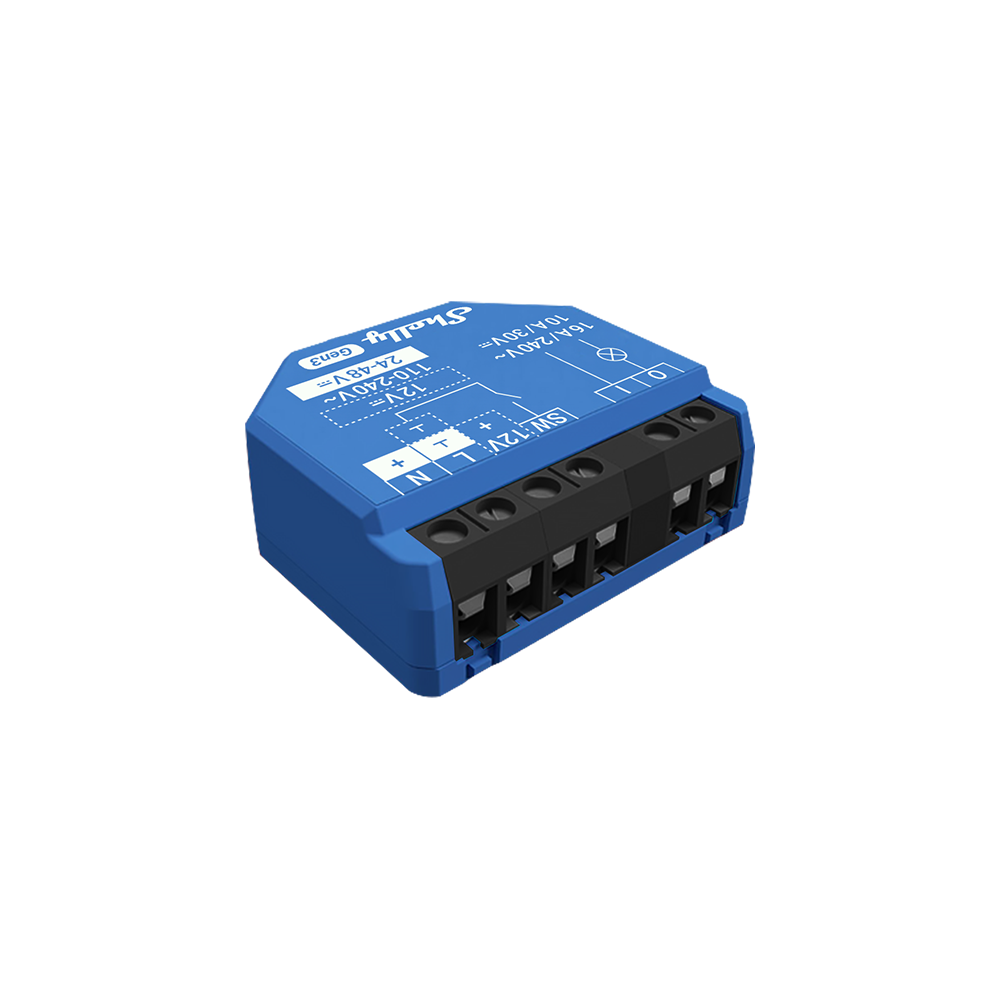
Maintain a healthy environment in your bathroom with Shelly H&T Gen3. By integrating the sensor with Shelly 1 wired to your bathroom fan, you can automate humidity control with ease. Set a scene where, upon detecting high humidity levels, Shelly Plus 1 activates the fan, effectively reducing moisture. This adds a touch of convenience to your daily routine, ensuring your bathroom remains comfortable and dry, automatically.
The Gen3 series ensures the quality and reliability of our devices by using our own powerful Shelly chip. Boasting 8MB of memory, this dramatically improves device performance and efficiency.
Unified Control with Virtual Components
The Gen3 Series introduces “virtual components, transforming how you manage and control 3rd party devices. Within the Shelly Smart Control app, you can now create virtual devices, integrating non-Shelly products into a unified control system.
More Memory, More Power
The Gen3 series ensures the quality and reliability of our devices by using our own powerful Shelly chip. Boasting 8MB of memory, this dramatically improves device performance and efficiency.
Unified Control with Virtual Components
The Gen3 Series introduces “virtual components, transforming how you manage and control 3rd party devices. Within the Shelly Smart Control app, you can now create virtual devices, integrating non-Shelly products into a unified control system.