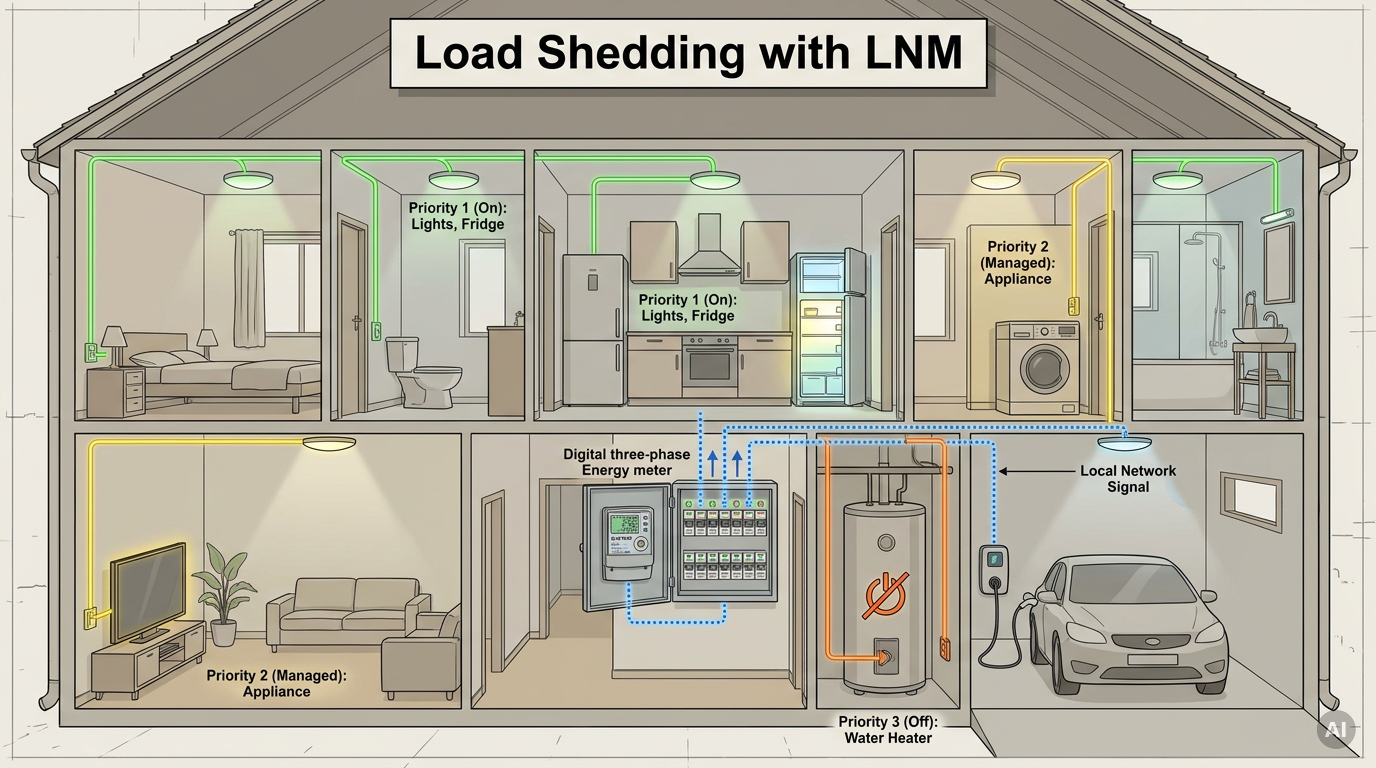
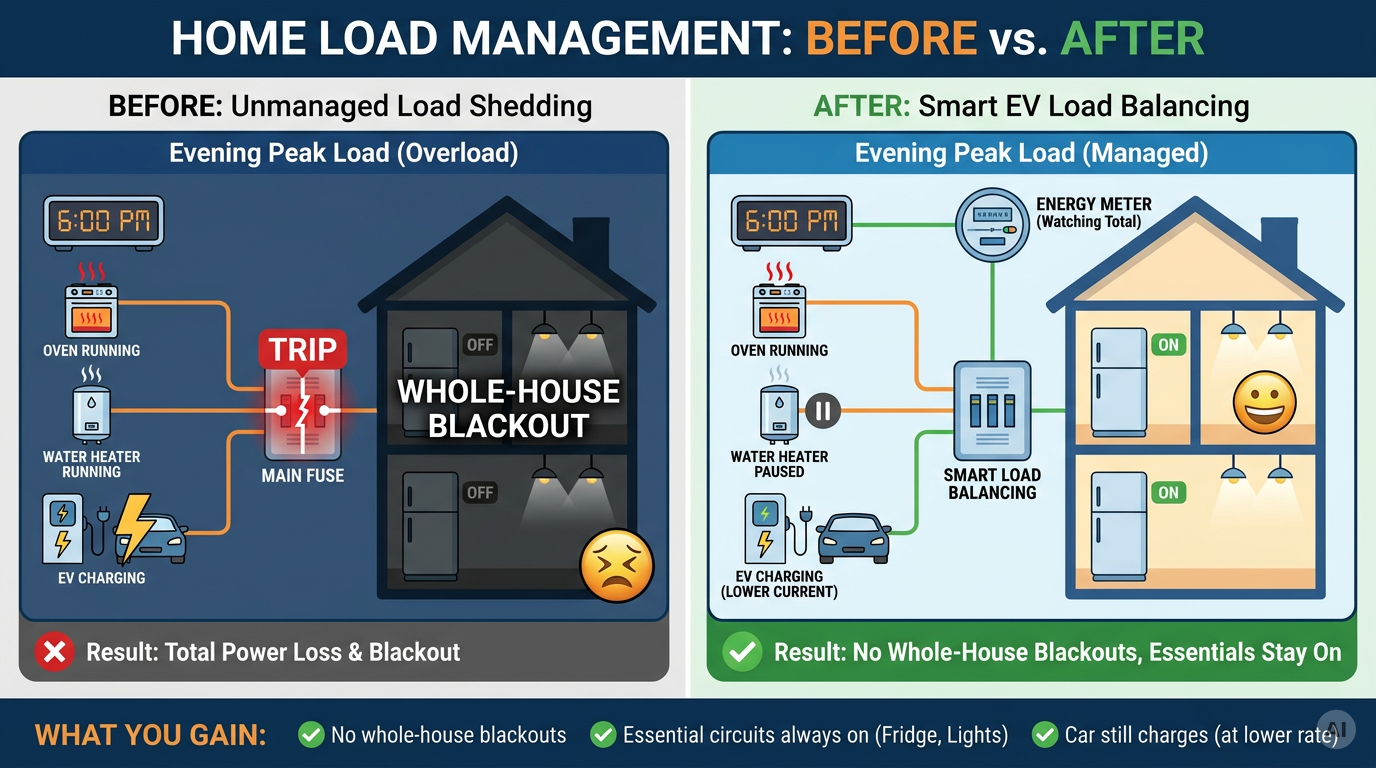
At 18:30 the oven, the water heater and the car charger all start within ten minutes, and the main fuse trips. With Local Network Messaging (LNM) in Shelly firmware 2.0, a Shelly Pro 3EM publishes every new house-load reading once to all listeners on the local network, and each Shelly Pro CB drops its own circuit by priority. A TopAC EV charger turns its current down at the same time, so the essentials stay on and the car keeps charging.
Overview
On a 3 x 25 A connection the main fuse doesn't care which appliance pushed it over. Once it trips, everything is off, including the fridge and the router. This guide keeps the total under the limit with two mechanisms that read the same Shelly Pro 3EM at the main incomer.
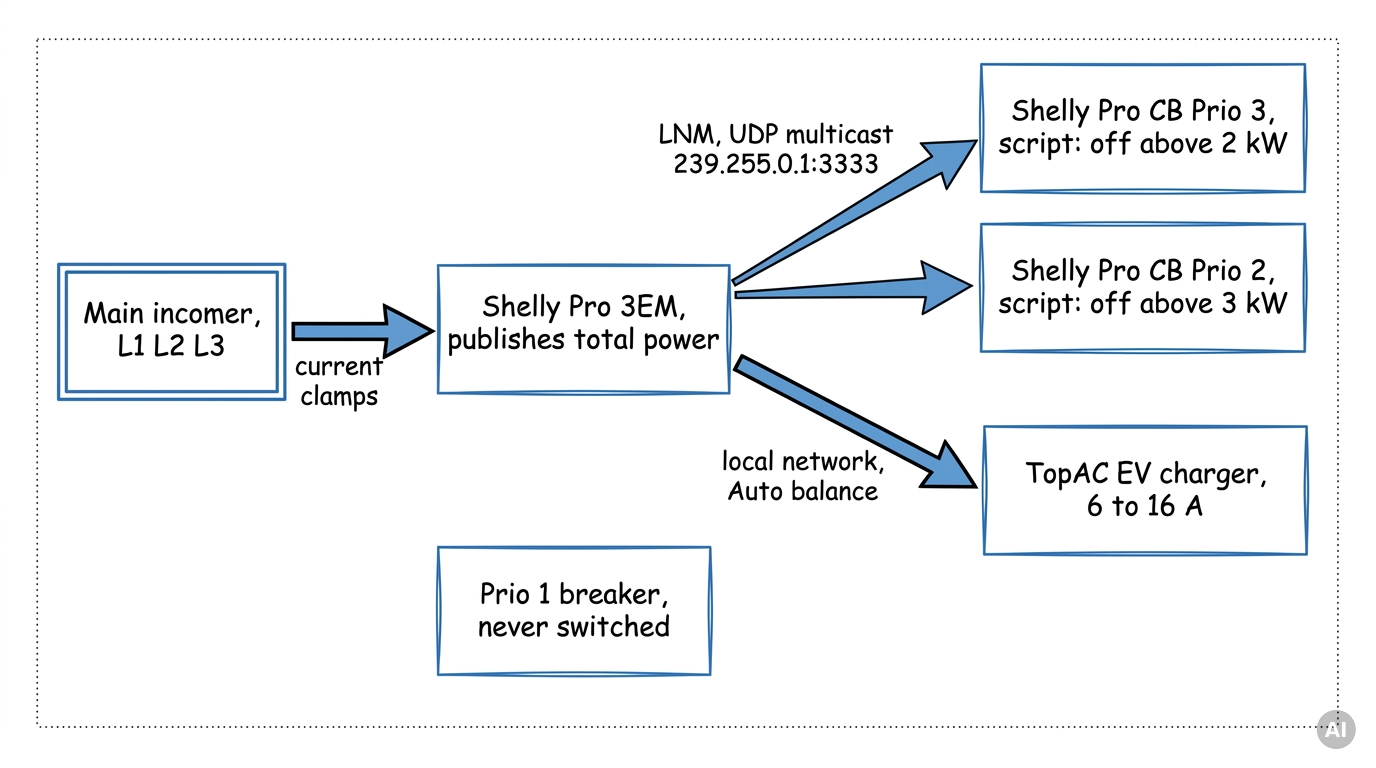
LNM in one paragraph. Local Network Messaging lets Shelly devices talk to each other directly over UDP multicast on your local network. One device publishes (TX) the status of selected components to a group address such as 239.255.0.1:3333. Every device that listens (RX) on the same address in the same network segment receives each update, without the cloud and without knowing the sender's IP address. Here the Pro 3EM publishes its em:0 power reading, and each Pro CB listens.
Part A, load shedding over LNM. Each Prio 2 and Prio 3 Pro CB runs a ready-made script that reads the total active power from the LNM messages. The Prio 3 breaker switches off above 2 kW, the Prio 2 breaker above 3 kW. Prio 1 is never touched. Each breaker decides on its own, so adding a circuit means setting up one more breaker, with nothing to change on the meter. Part A runs entirely on the local network, with no cloud and no polling.
Part B, dynamic load balancing. The TopAC portable EV charger EVE01-11R reads the same Pro 3EM through its built-in Auto balance function. It adjusts its charging current between 6 A and 16 A so the total stays under the current limit you set, with a 2 A reserve kept in hand.
Important scope note: load shedding is a comfort layer on top of protection, not a replacement for it. The Pro CB still trips by itself on overcurrent and short circuit. A Pro CB can be switched on remotely only if it was switched off remotely: after a real trip, after a manual off with the lever, or with the front safety switch locked, the script leaves it off. The Pro CB is rated for less than 1 remote toggle per minute, so the script keeps every breaker off for at least 5 minutes and on for at least 1 minute. The 2 kW and 3 kW values are examples; size yours from your main fuse rating. If LNM messages stop arriving, the breakers keep their current state and the main fuse is the only protection left. The LNM API is currently published as a preview and may change between firmware releases, so check the LNM documentation after updates.
Prerequisites
-
Shelly Pro 3EM in its default three-phase profile (the profile that reports
em:0), with its current clamps on L1, L2 and L3 at the main incomer (after the utility meter), so it measures the whole house. -
Shelly Pro CB, one per Prio 2 and Prio 3 circuit: Pro 1CB to Pro 4CB, depending on the number of poles and whether the neutral must be switched, with a rated current that matches the cable. The Prio 1 circuit can sit on a Pro CB too, for monitoring and trip notifications; it gets no script.
-
Firmware 2.0.1 or newer on the Pro 3EM and on every Pro CB that takes part. LNM arrived in 2.0.0, and 2.0.1 adds a Pro CB fix that prevents unexpected automatic reclosure.
-
TopAC portable EV charger EVE01-11R on its own CEE 16 A three-phase socket, protected by a 3-pole 20 A type B or C breaker, as the charger's documentation specifies. Its built-in leakage protection is rated Type A (30 mA AC) + 6 mA DC; add the upstream residual-current protection your local wiring rules require.
-
All devices in the same network segment, with client (AP) isolation off. If your switches use IGMP snooping, the network needs an IGMP querier, or multicast won't be delivered.
-
Shelly Smart Control app, plus each device's local web interface for the scripts.
-
Installation of Shelly Pro 3EM must be performed by a qualified electrician (Shelly Pro 3EM user and safety guide).
-
Installation of Shelly Pro CB must be performed by a qualified electrician (Shelly Pro CBs user and safety guide).
Steps
Part A: Load shedding over LNM with Shelly Pro CB
-
Sort the circuits into three priorities. Prio 1: what must never go off, such as the fridge, lighting, network and heating controls. Prio 2: large loads that can pause for a few minutes. Prio 3: loads that can wait longest, such as a water heater or a towel rail.
-
On the Prio 2 and Prio 3 Pro CBs, check that the front safety switch is unlocked. When it is locked, the breaker ignores every remote command, including its own script.
-
Write down what each Prio 2 and Prio 3 circuit draws when it is running: switch its load on and read the change in the Pro 3EM total. You need this number in step 6.
-
Pick one group address for the whole installation, for example
239.255.0.1:3333. Use the239.255.x.yrange and a port between 1024 and 65535. Every device in this setup uses exactly the same address and port. -
Set up the Pro 3EM as the publisher. In its local web interface, open Scripts, create a script named
lnm-publisher, paste Script 1 from the block below, setADDRto your group address and press Start. It creates the LNM instance, publishes onlyem:0and then stops itself. The console printsLNM TX on lnm:200 ready. You run it once; the setting stays after a reboot.
-
Set up each Prio 2 and Prio 3 Pro CB as a listener. Open Scripts, create a script named
lnm-load-shedding, paste Script 2 from the block below and set the values inCFGfrom the table. Setrestore_wtoshed_wminus the load from step 3, minus a margin of at least 10% ofshed_w. Save, press Start, and switch on Run on startup. The script joins the LNM group by itself and remembers across reboots that it switched the breaker off. The console printsListening on lnm:200.
| Value in CFG | Prio 3 breaker | Prio 2 breaker | Why the two differ |
|---|---|---|---|
|
| 2000 W | 3000 W | Prio 3 goes first |
|
| 10 s | 30 s | On a sudden jump, Prio 3 sheds first and Prio 2 only if the load is still too high |
|
| Example: 400 W (1.5 kW heater) | Example: 1000 W | From step 3: shed_w minus circuit load minus margin |
|
| 120 s | 60 s | Prio 2 returns first, Prio 3 after it |
|
| 360 s | 300 s | Keeps both from returning at the same moment |
|
| 60 s | 60 s | Pro CB limit: under 1 remote toggle per minute |
-
Check that the messages arrive. On a Pro CB, open
http://in a browser on the same network./rpc/LNM.GetStatus?id=200 stats.rx_msgsshould keep rising while the Pro 3EM reading changes. If it stays at 0, see Troubleshooting. -
Test it. Switch on a known load that takes the total above 2 kW. After about 10 seconds the Prio 3 lever drops, its mechanical state indicator turns green and its script console prints
Shed. Switch the load off. Prio 3 returns once it has been off for at least 6 minutes and the total has stayed below itsrestore_wfor 2 minutes.
Part B: Dynamic load balancing with the TopAC EV charger
-
Add the charger to Shelly Smart Control and update the firmware on both the charger and the Pro 3EM.
-
In the charger's settings, enable Auto balance, select the Pro 3EM as the energy meter and set the Total current limit. "Total" means house plus car together. Enter your main fuse rating per phase, for example 25 A on a 3 x 25 A supply, not 75 A. The charger keeps 2 A below this value as a safety reserve.
-
Leave Auto balance in its default mode when the Pro 3EM clamps sit at the main incomer. In this mode the charger is part of the measured system, and it subtracts its own measured current from the Pro 3EM reading so the car isn't counted twice.
-
Check the configuration over the local API: open
http://. Under/rpc/Service.GetConfig?id=0 auto_balanceyou should seeenable: true,em_ipset to the Pro 3EM address,max_currentset to your limit andexclude_self_current: true(the subtraction from step 3). -
Test it. Start charging at 16 A, then switch on the oven and a kettle. The charging current shown in the app drops, and ramps back up once they switch off.
Troubleshooting
-
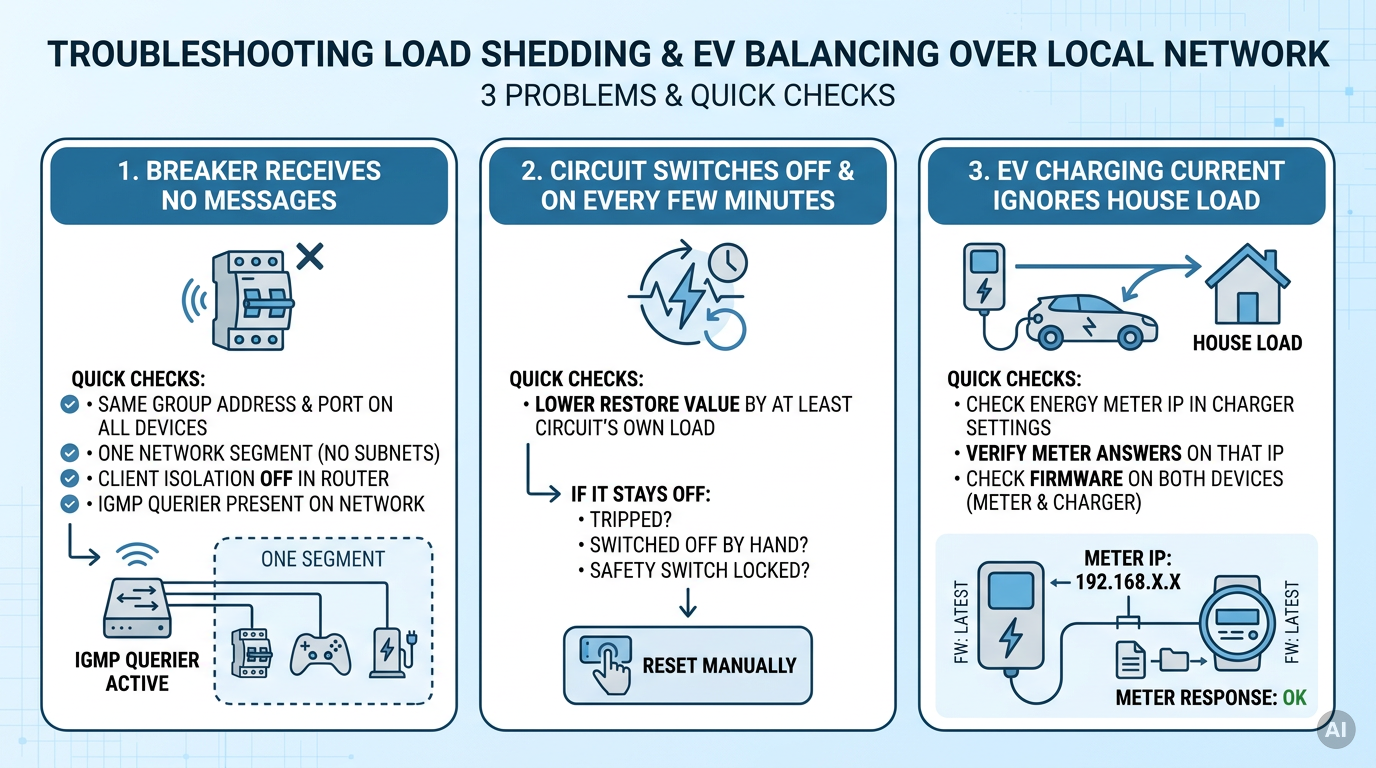
rx_msgsstays at 0 on a Pro CB → check that the address and port match exactly on all devices, that they are in one network segment, that client (AP) isolation is off, and that an IGMP querier is present if IGMP snooping is on. -
A Prio circuit switches off and on again and again → its
restore_wis too close toshed_w; lower it by at least that circuit's own load. If it stays off instead, check whether it tripped, was switched off with the lever, or has its safety switch locked, and reset it by hand. -
Charging current ignores the house load → check
em_ipinService.GetConfig, that the Pro 3EM answers on that IP, and the firmware on both devices.
Tips
-
Using both parts on one supply: at its 6 A minimum, a three-phase car draws about 4.1 kW (3 x 6 A x 230 V). That is above both example limits, so every charging session would shed Prio 2 and Prio 3, and they stay off for as long as the car fills the remaining headroom. Size the shed limits from the main fuse instead (3 x 25 A at 230 V is about 17 kW), and keep
restore_wabove what the house draws while the car charges at its limit. -
The script compares total power across all three phases, while the main fuse protects each phase separately. If one heavy load sits on a single phase, compare that phase's power (
a_act_power,b_act_powerorc_act_powerinem:0) instead oftotal_act_power. -
Every remote switch-off counts as an electrical cycle, and the Pro CB is rated for more than 6,000. Watch
total_cyclesinCB.GetStatus. If a circuit sheds many times a day, raisemin_off_sor the shed limit. -
If another Shelly device also publishes
em:0in the same group, fill inmeter_idwith the Pro 3EM's Device ID (Settings, Device information in the app) so each breaker listens only to the right meter. -
To add another shed circuit later, set up only the new breaker with Script 2 and its own values. The Pro 3EM and the other breakers stay as they are.
Devices Used
-
Shelly Pro 3EM
-
Shelly Pro CB (Pro 1CB to Pro 4CB)
-
TopAC portable EV charger EVE01-11R (Powered by Shelly)
Documentation & References
-
Shelly Pro CBs — remote switch-on rules, safety switch, the under-1-per-minute toggle limit and 6,000-cycle rating; useful for
min_off_s,min_on_sand Troubleshooting. -
TopAC portable EV charger EVE01-11R — Auto balance modes, Total current limit with 2 A reserve, 6–16 A range and supply requirements; useful for Part B.
-
LNM Components — LNM configuration fields, the
rxevent Script 2 listens to and theLNM.GetStatuscounters; useful for Part A, steps 5–7.
Why It's Worth It
The meter publishes each reading once, and every breaker acts on it locally, with no cloud, no polling and no breaker IP addresses to maintain. The fridge and the lights stay on, and the car charges at whatever current the house can spare instead of tripping the main fuse.
Conclusion
The Pro 3EM now publishes the house load over LNM, and each priority breaker acts on it by itself with a ready-made script. Low-priority circuits drop in a fixed order and come back when there is room, and the car charges at whatever current is left.
--- vertical: home-energy-management concept: lnm-load-shedding-ev-load-balancing complexity: advanced devices: [Shelly Pro 3EM, Shelly Pro CB, TopAC portable EV charger EVE01-11R] --- 


