No priority exists between a Shelly schedule and a manual command — the relay simply follows whichever one arrived last. This guide explains why, and how to limit manual control when a schedule needs to hold, from an Auto off timer to a detached switch input.
Overview
A common question from users who control a load – for example an electric water heater – with a schedule on a Shelly relay: "If I press the power button in the app outside the scheduled hours, will the heater turn on? Is there a priority between the schedule and the manual command?"
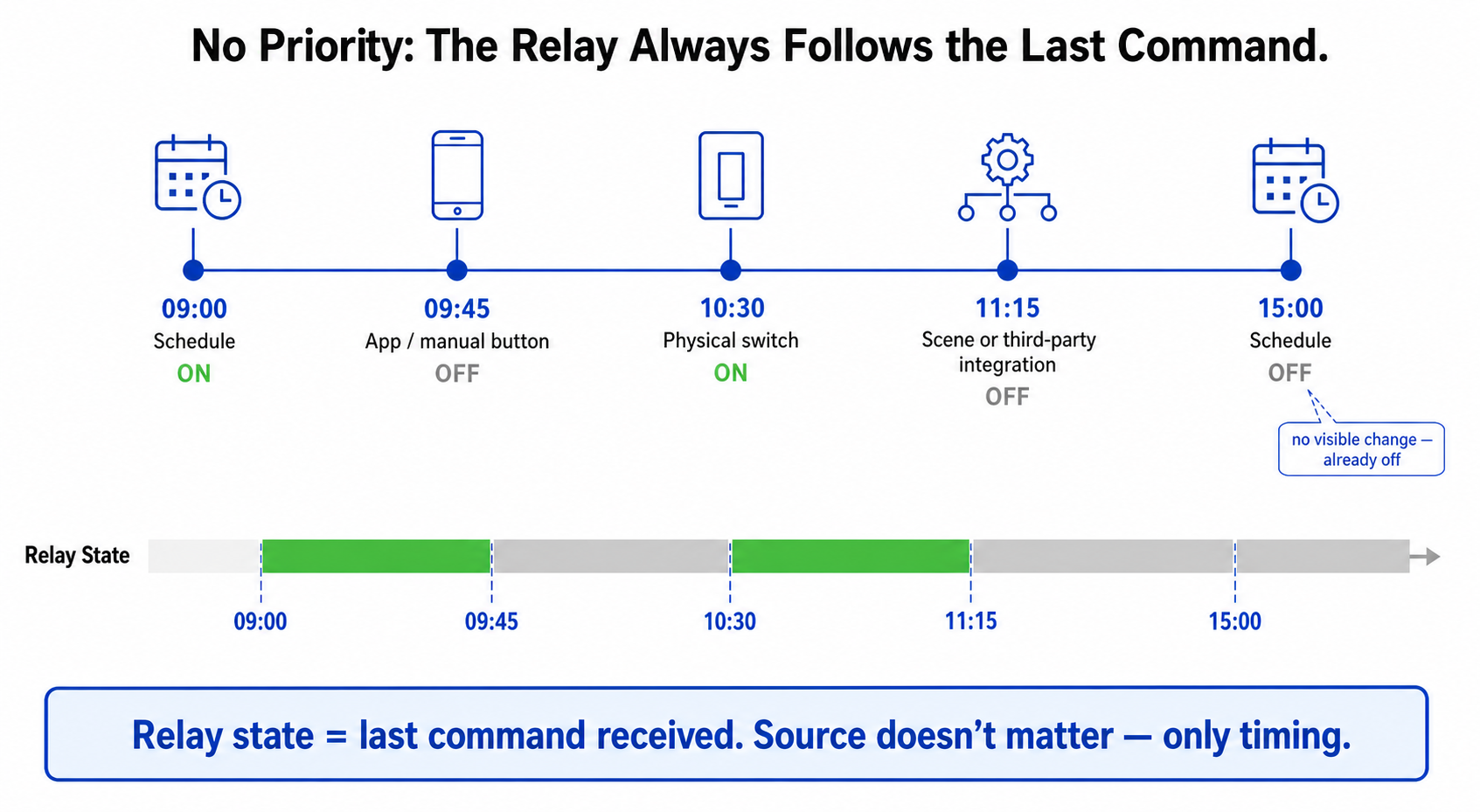
The short answer: the manual command is executed, and there is no priority. A schedule is simply a command that the device executes at a set time. The power button in the app is the same command, executed immediately. The relay always follows the last command it received, from whichever source.
Prerequisites
-
Any Shelly relay with schedule support (for example Shelly Pro 1PM or Shelly 1PM Gen3), added to the Shelly Smart Control app.
-
A schedule already configured on the device. The examples below use a heating window from 11:00 to 15:00: one schedule turns the relay On at 11:00 and a second one turns it Off at 15:00.
How a Schedule and a Manual Command Interact
The schedule acts only at the two moments it is set for – 11:00 and 15:00. In between, and outside the window, it does nothing and does not "hold" the state. Every other command – from the app, from a physical switch on the SW input, from a scene, or from a third-party integration – is executed immediately and is not checked against the schedule.
What to Expect
-
Manual On outside the window (for example at 20:00): the relay turns on immediately and stays on until it is switched off manually, until an Auto off timer expires, or until the next scheduled Off at 15:00 on the following day.
-
Manual Off inside the window (for example at 12:00): the relay stays off until the next scheduled On at 11:00 on the following day – the schedule does not restore the state in between.
-
Manual On shortly before the window (for example at 10:30): the scheduled On at 11:00 has no visible effect; the run ends at the scheduled Off at 15:00, or earlier if an Auto off timer expires first.
-
Physical switch, scenes and integrations: a command from the SW input, from a scene or from a third-party system behaves exactly like the app button.
-
Power cut: after power returns, the relay follows its power-on default (Settings → Input/Output Settings). A scheduled event that falls within the power cut is not executed afterwards; the next scheduled event runs normally.
The Activity log tab of the device records every On/Off event with its date and time, so it is easy to check what happened and when.
If Manual Control Has to Be Limited
-
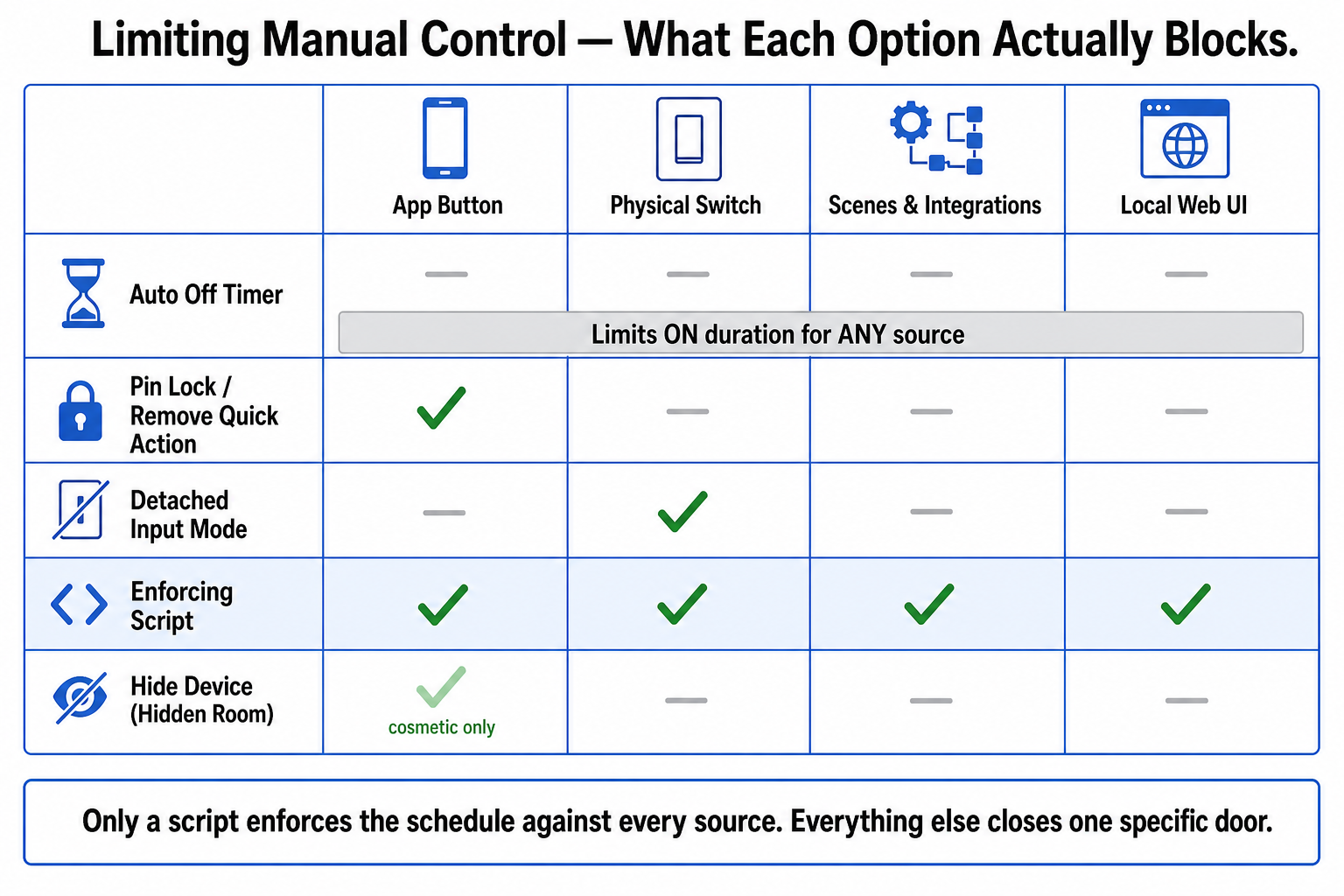
Limit the duration – set an Auto off timer (Timer tab, value in seconds, for example 14400 for 4 hours). Every On, from any source, then ends automatically after the set time. The timer also applies to the scheduled On, so set it equal to or longer than the heating window.
-
Prevent accidental taps in the app – enable the Pin Lock under Application Settings, or remove the quick action from the device card (Application Settings → Device Card Customization → Big Parameter Slot → Parameter). Both are app-side only.
-
Stop the physical switch from overriding the schedule – set the input to Detached under Settings → Input/Output Settings.
-
Hide the device from everyday use – move the device to a hidden room, so it no longer appears on the dashboard or in the room views. The schedule keeps running, and the device can still be opened from the hidden room when needed. Keep in mind that its consumption and status are hidden from view as well. Like the Pin Lock, this is app-side only – it does not affect scenes, integrations, a physical switch or the device's local web interface.
Devices Used
-
Shelly Pro 1PM
-
Shelly 1PM Gen3
Documentation & References
-
Shelly Pro 1PM — Knowledge Base — firmware capabilities (20 schedules), the SW1/SW2 switch inputs and a link to the web interface guide; useful for setting up the schedule and the Detached input described above.
-
Shelly 1PM Gen3 — Knowledge Base — firmware capabilities (20 schedules) and the SW input the physical switch connects to; useful for setting up the schedule and the Detached input described above.
Conclusion
A Shelly schedule and the manual power button are equal: whichever command comes last decides the state of the relay, and the schedule does not enforce anything between its set times. This is by design – it keeps manual control available at all times. When a load must stay within its schedule, the options above add that restriction step by step, from a simple Auto off timer to a detached switch input.
We Value Your Feedback!
Thank you for taking the time to read our article! Was it helpful or interesting?
Your insights can help us improve. We'd be grateful for any feedback. If you have a moment, please share it with us at the following email:


