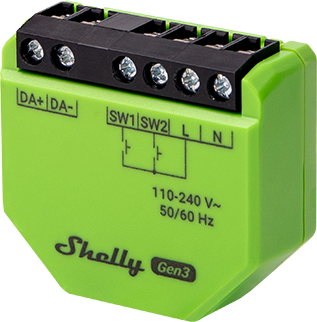
Device identification
-
Device name: Shelly DALI Dimmer Gen3
-
Device model: S3DM-0A1WW
-
Device SSID: ShellyDDimmerG3-XXXXXXXXXXXX
-
Device Bluetooth ID: 0x1071
Short description
Shelly DALI Dimmer (the Device) is a gateway device between Shelly ecosystem and APIs and a DALI network of lights. It can control DALI capable light sources that contain DALI control gear.
In terms of DALI it is a single-master application controller, supporting LED control gear (Part 207), which does not share the bus with other DALI control devices. Shelly DALI Dimmer controls all connected DALI control gear as a single group with broadcast messages.
The Device contains a bus power supply with possibility to control up to X non-powered bus units.
The Shelly DALI Dimmer can be accessed, controlled, and monitored remotely from any place where the User has internet connectivity, as long as it is connected to a Wi-Fi router and the Internet.
It has an embedded Web Interface which can be used to monitor and control the Device, as well as adjust its settings.
Main features
-
DALI application controller: Supports DALI bus control in a single-master configuration of direct or indirect DALI control gear lights.
-
DALI features: Control light intensity of attached control gear (DT6). Color temperature control is not supported.
-
DALI power on default: off
-
DALI on bus failure: turn on at 100%
-
Shelly Plus Add-on compatible: The Device supports connection with the sensor interface to the Shelly Plus devices.
-
Switch/Button input mode: Allows flexible input control through switches or buttons.
-
One/dual button dimming control: Allows to use the full functionalities of the Device for dimming control with any wall switch configuration.
-
Night mode: Enables to set a specific brightness of input lights during nighttime.
-
Min/Max brightness: Reframes the range of the dimming signal to get more precise brightness control on the output.
-
Button fade rate: Controls how quickly the output brightness changes while holding the button(s).
-
Transition duration: Controls the time for dimming from 0 to 100 %.
-
Weekly schedules: Supports daily schedules and routines, including setting of brightness, transition duration, and flip value of the dimming signal.
-
Auto on/off timers: Enables auto on/off timer setting.
-
Local actions: Allows creating automation scenarios within the local Wi-Fi network, including setting of brightness, transition duration, and flip value of the dimming signal.
-
Webhooks: Support automation through lightweight, event-driven communication with other devices.
-
BLE Gateway: Facilitates communication between BLE and Wi-Fi-enabled devices.
-
Wi-Fi Range Extender: Retransmits the Wi-Fi signal and extends its reach.
-
Scripting: Allows creating automation scenarios through scripts.
-
Compatibility: Highly compatible with 3rd Party home automation systems.
-
KNX: Supports KNXnet/IP communication
-
No need for hub: Ready for use locally or remotely via Shelly Smart Control or 3rd Party systems.
Use cases
-
Add DALI lights to a Shelly ecosystem
-
Use Shelly interfaces - application, local APIs to control DALI lights
Integrations
Amazon Alexa supported capabilities
-
Brightness Controller
Google Smart Home supported traits
-
Brightness
Samsung SmartThings supported capabilities
-
Color Control
Simplified internal schematics
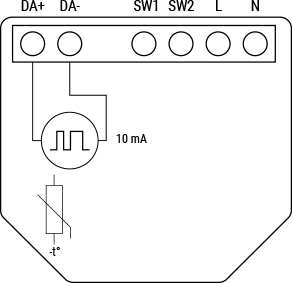
Device electrical interfaces
Inputs
-
2 switch/button inputs on screw terminals: S1 and S2
-
2 power supply inputs on screw terminals: 1 N and 1 L
Outputs
-
2 DALI bus lines: D+ and D-
Add-on interface
-
Shelly proprietary serial interface
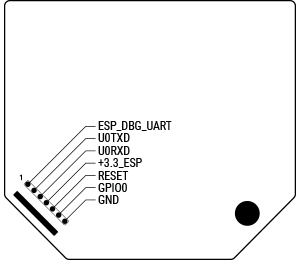
⚠CAUTION! High voltage on the add-on interface when the Device is powered!
Connectivity
-
Wi-Fi
-
Bluetooth
Safety function
-
Overheating protection
Supported load types
-
Can control up to 5 DALI bus units. Rated current of internal power supply 10mA. Bus units should be externally powered.
-
Contains DALI bus power supply with a maximum output current less than 35mA
User interface
Inputs
Specifications
| Quantity | Value |
|---|---|
| Physical | |
| Size (HxWxD): | 42x37x17 mm / 1.65x1.46x0.66 in |
| Weight: | 18 g / 0.63 oz |
| Screw terminals max torque: | 0.4 Nm / 3.5 lbin |
| Conductor cross section: | 0.5 to 1.5 mm² / 20 to 16 AWG (solid, stranded, and bootlace ferrules) |
| Conductor stripped length: | 5 to 6 mm / 0.20 to 0.24 in |
| Mounting: | In-wall, suspended ceilings |
| Shell material: | Plastic |
| Shell color: | Green |
| Environmental | |
| Ambient working temperature: | -20 °C to 40 °C / -5 °F to 105 °F |
| Humidity: | 30 % to 70 % RH |
| Max. altitude: | 2000 m / 6562 ft |
| Electrical | |
| Power supply: | 110 - 240 VAC ±10% 50/60Hz |
| Power consumption: | < 2 W |
| Neutral not needed: | No |
| Output circuits ratings | |
| Bus power supply | Guaranteed 10mA (up to 5 DALI control gear units), Short circuit current < 35 mA |
| Bus voltage | 16V nominal |
| Sensors, meters | |
| Internal-temperature sensor: | Yes |
| Radio | |
| Wi-Fi | |
| Protocol: | 802.11 b/g/n |
| RF band: | 2401 - 2495 МHz |
| Max. RF power: | < 20 dBm |
| Range: | Up to 30 m / 100 ft indoors and 50 m / 160 ft outdoors |
| Bluetooth | |
| Protocol: | 4.2 |
| RF band: | 2400 - 2483.5 MHz |
| Max. RF power: | < 4 dBm |
| Range: | Up to 10 m / 33 ft indoors and 30 m / 100 ft outdoors |
| Microcontroller unit | |
| CPU: | ESP32-C3 Shelly |
| Flash: | 8 MB |
| Firmware capabilities | |
| Schedules: | 20 |
| Webhooks (URL actions): | 20 with 5 URLs per hook |
| Scripting: | Yes |
| MQTT: | Yes |
| Encryption: | Yes, TLS 1.2 |
Basic wiring diagrams
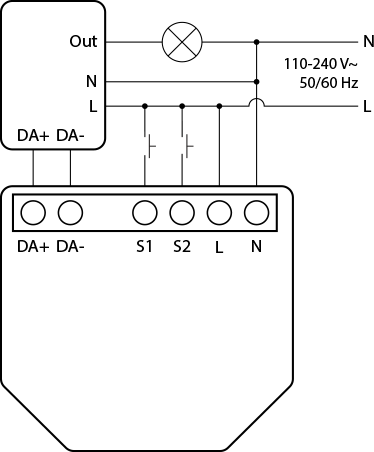
Legend
| Terminals | | Wires | |
|---|---|---|---|
| N | Neutral terminal | N | Neutral wire |
| L | Live (110-240 V~) terminal | L | Live (110 - 240 V~) wire |
| Out | Dali dimmer load output | | |
| S1, S2 | Switch input terminals | | |
| DA+ | Dali interface positive terminal | | |
| DA- | Dali interface negative terminal | | |
Troubleshooting
-
Ensure that the device is properly powered:
-
Check power cables, outlets, and any power indicators on the device.
-
-
Inspect Connections:
-
Verify that all connections, including cables and wiring, are secure and properly seated. Loose connections can lead to functionality issues.
-
-
Review Device Settings:
-
If applicable, check and review the device settings. Ensure that configurations are correct and match your intended use.
-
-
Update Firmware/Software:
-
Check if there are any available firmware or software updates for the device. Keeping the device up-to-date can resolve known issues and improve performance.
-
-
Restart or Reboot:
-
Sometimes, a simple restart can resolve temporary glitches. Turn off the device, wait a few seconds, and then power it back on.
-
-
Check Network Connection:
-
If the device is connected to a network, ensure that the network settings are correct. Test the network connection and consider restarting routers or switches if needed.
-
-
Inspect Physical Components:
-
Physically inspect the device for any signs of damage, overheating, or unusual behavior.
-
-
Check Compatibility:
-
Ensure that the device is compatible with other components in your system, including hardware and software. Incompatibility issues can lead to malfunctions.
-
-
Monitor Environmental Factors:
-
Consider environmental factors such as temperature and humidity.
-
-
Inspect Power Supply Quality:
-
Poor power quality, including voltage spikes or fluctuations, can affect device performance. Consider using a surge protector or voltage regulator if needed.
-
*These are general troubleshooting steps, and the specific steps may vary based on the type of device or issue you are facing. If the issue persists and you are unable to resolve it, consider reaching out to our technical customer support.
Shelly Smart Control
Shelly Web user interface
Components & APIs
Compliance
-
Shelly DALI Dimmer Gen3 multilingual EU declaration of conformity 2025-07-22.pdf
-
Shelly DALI Dimmer Gen3 AU NZ Certificate for Suitability.pdf
-
Shelly DALI Dimmer Gen3 UK PSTI ACT Statement of compliance.pdf


