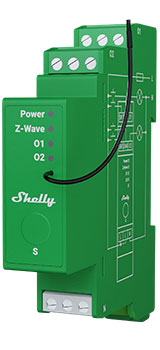
Device identification
Device: Shelly Wave Pro Dimmer 2PM (US)
US Part number/Ordering Code: QUDM-0A2P01US
Z-Wave Product type ID: 0x0001
Z-Wave Product ID: 0x0082
Z-Wave Manufacturer: Shelly Europe
Z-Wave Manufacturer ID: 0x0460
This device supports both Z-Wave® (mesh) and Z-Wave® Long Range (star) network topologies. During the device inclusion process, you must select one type of network topology.
Bellow sections marked with * are valid only for Z-Wave® mesh network inclusion and are not applicable for Z-Wave® Long Range star network inclusion.
Terminology
Short description
The Device is a DIN-rail mountable , two-channel smart dimmer. It can work as a standalone or it can also be operated through Z-Wave® home automation. The Device can be accessed, controlled, and monitored remotely from any place where the User has internet connectivity, provided that the module is connected to a Z-Wave Gateway with internet access. It is compatible with switches and push-buttons (default).
Basic Functions
-
SmartStart
-
Assocciations
-
Working as Z-Wave repeater
-
Input modes
-
Output types
-
Minimum Brightness on Toggle On
-
Min/max brightness definition
-
Button fade rate definition
-
Single button dimming control
-
Dual button dimming control
-
Transition Duration
-
Calibration
-
Measuring Power consumption (W) and Energy consumption (kWh) of the load connected to O (O1)
-
Measuring Power consumption (W) and Energy consumption (kWh) of the load connected to O2
-
OTA - Over-The-Air firmware update
Operational Instructions
Main applications
-
Residential
-
MDU (Multi Dwelling Units - apartments, condominiums, hotels, etc.)
-
Light commercial (small office buildings, small retail/restaurant/gas station, etc.)
-
Industrial (factories, power plants, water processing, refineries, etc.)
-
Government/municipal
-
University college
-
Farming
Integrations
Shelly Wave devices are developed on the world's leading technology for smart homes – Z-Wave.
This means Shelly Wave works with all certified gateways supporting Z-Wave communication protocol.
To make sure the functions of Shelly Wave products are supported on your gateway, we are regularly executing compatibility tests of our devices with different Z-Wave gateways.
Simplified internal schematics
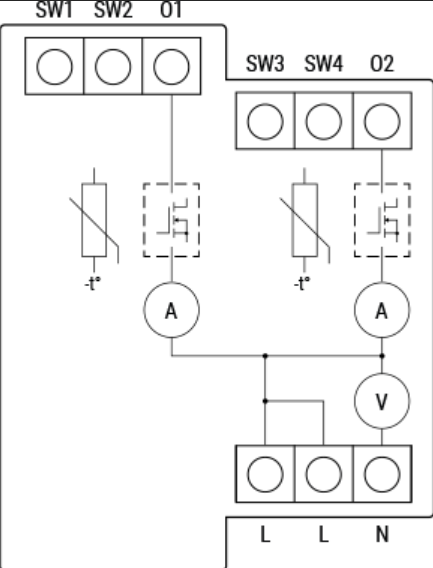
Device electrical interfaces
Inputs
4 switch/push-button inputs on screw terminal
3 power supply inputs on screw terminals: N, 2 L
Outputs
-
2 outputs
Connectivity
Unsecure, S0 Security, S2 Unauthenticated Security, S2 Authenticated Security
Safety features
Protection
Overheat Protection
Overcurrent Protection
Overvoltage Protection
Supported load types
Dimmable LED lamps: up to 200W per channel
Incandescent bulbs: up to 200W per channel
Halogen lamps: up to 200W per channel
Iron-core transformer with low-voltage incandescent lamps: up to 200VA per channel
Dimmable electronic transformers: 200W per channel
User interface
S button and operating modesSettings mode:Is required to start the desired procedure, for example: adding (inclusion (*not available for Long Range devices)), removing (exclusion), factory reset, etc. It has a limited operating time. After completing the procedure in Setting mode, the Device automatically switches to Normal mode. Entering Setting mode:Press and hold the S button on the Device until the LED turns solid blue.An additional quick press on the S button changes the menu in an infinite loop.The Menu LED status has a timeout of 10s before entering again into Normal mode.
S button’s functionsManually adding the Device to a Z-Wave network (*not available for Long Range inclusion)Manually removing the Device from a Z-Wave networkFactory Reset the Device
-
Calibration
LED Signalisation
Click to hide/unhide
General rulesSwitching between Normal and Settings mode is done by press and hold the S button.Solid LED means that you are in the Settings mode (this is not valid for Plugs). Once in settings mode, switch to normal mode goes automatically after 10s.If the LED is not in Alarm mode, it will turn off after a timeout of 30min. Pressing the S button or power cycling the Device will wake the LED for 30min.During module boot up LED will blink in mode 5 (0,2s On blue/0,2s On red) for 4-5 s.Normal mode LED status: Normal mode is defined by stable device function that can remain for an infinite time.
LED type: RGB dimmable
Normal mode
Removed/Excluded not calibratedThe LED will be blinking blue and yellow in Mode 1 for 30min after every power cycle and 10min after S button pressed. 
Added/Included not calibratedThe LED will be blinking green and yellow in Mode 1 for 10min after every power cycle and 10min after S button pressed. 
Removed/Excluded & calibrated
The LED will be blinking blue and green in Mode 1 for 30min after every power cycle and 10min after S button pressed.

Added/Included & calibratedThe LED will be blinking green in Mode 1 for 30min after every power cycle and 10min after S button pressed. 
Settings in progress
Factory reset and rebootDuring factory reset, the LED will turn solid green for approx. 1sec, then the blue and red LED will be blinking 0,1s On / 0,1s Off for about 2sec.
Adding / RemovingDuring adding or removing, the LED will be blinking blue in Mode 2. 
OTA firmware updatingDuring the OTA update, the LED will be blinking blue and red in Mode 2. 
Checking AC or DC voltage power supplyDuring checking the power supply, the LED will be blinking blue and red in Mode 5. 
Load calibrationDuring the calibration, the LED will be blinking yellow in Mode 2. 
Settings mode with S button
Adding / Removing menu selected (*adding not available for Long Range inclusion)When the menu is selected the LED will be on blue, for maximum of 10 seconds.
Adding / Removing menu - while pressing S- button - Add/Remove process selected (*adding not available for Long Range inclusion)When the menu is executing the LED will be blinking blue in Mode 3. 
Factory reset menu selectedWhen the menu is selected the LED will be on red, for maximum of 10 seconds.
Factory reset - while pressing S - button - Factory reset process selectedWhen the menu is executing the LED will be blinking red in Mode 3. 
Calibration menu selectedWhen the menu is selected the LED will be on yellow, for maximum of 10 seconds.
Calibration - while pressing S- button - Calibration process selectedWhen the menu is executing the LED will be blinking yellow in Mode 3. 
Alarm Mode
Overheat detected The LED will be blinking red in Mode 4 
Overcurrent detected O1The LED will be blinking red in Mode 4 
Overcurrent detected O2The LED will be blinking red in Mode 4 
Overvoltage detectedThe LED will be blinking red in Mode 4 
LED blinking modes
Specifications
| Power supply | 110 - 240 V AC 50/60 Hz | |
| Power consumption | < 0.3 W | |
| External protection | 10 A, tripping characteristic B or C, | |
| Dimming type | Trailing edge | |
| Power measurement [W] | Yes | |
| Max. output power | 200 W per channel | |
| Overheating protection | Yes | |
| Overcurrent protection | Yes | |
| Overvoltage protection | Yes | |
| Long range network | Distance (depends on local condition) | Up to 80 m indoors (262 ft.) or up to 1000 m outdoors (3281 ft.) |
| Z-Wave® repeater | No | |
| Z-Wave® frequency bands | 912 MHz | |
| Mesh network | Distance (depends on local condition) | Up to 40 m indoors (131 ft.) |
| Z-Wave® repeater | Yes | |
| Z-Wave® frequency bands | 908.4 MHz | |
| CPU | Z-Wave® S800 | |
| Size (H x W x D) | 94x19x69 ± 0.5 mm / 3.70x0.75x2.71 ± 0.02 in | |
| Weight | 75 g / 2.7 oz | |
| Mounting | DIN rail | |
| Screw terminals max. torque | 0.4 Nm / 3.54 lbin | |
| Conductor cross section | 0.5 to 2.5 mm² / 20 to 14 AWG (green connector) | |
| Conductor stripped length | 6 to 7 mm / 0.24 to 0.28 in (green connector) | |
| Shell material | Plastic | |
| Color | Lime | |
| Ambient temperature | -20°C to 40°C / -5°F to 105°F | |
| Humidity | 30% to 70% RH | |
| Max. altitude | 2000 m / 6562 ft. | |
Basic wiring diagram
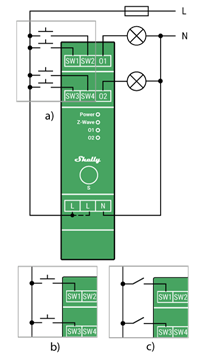
Fig.1
Legend
Device terminals:
-
N: Neutral terminal
-
L: Live terminal(s) (110-240 V AC)
-
SW (SW1): Switch/push-button input terminal (controlling O (O1))
-
SW2: Switch/push-button input terminal
-
SW3: Switch/push-button input terminal (controlling O2)
-
SW4: Switch/push-button input terminal
-
O (O1): Load circuit (1) output terminal
-
O2: Load circuit 2 output terminal
Wires: -
N: Neutral wire
-
L: Live wire (110-240 V AC)
Button: -
S: S button
About Z-Wave®
Click to unhide/hide
The Z-Wave® protocol is an interoperable, wireless, RF-based communications technology designed specifically for control, monitoring, and status reading applications in residential and light commercial environments. Mature, proven, and broadly deployed, Z-Wave® is by far the world market leader in wireless control, bringing affordable, reliable, and easy-to-use 'smart' products to millions of people in every aspect of daily life.
Interoperability has always been at the core of the Z-Wave® protocol, alongside the features like backward compatibility, security, and reliability. All Z-Wave® devices can be operated in any Z-Wave® network with other Z-Wave® certified devices, regardless of brand or manufacturer. All mains operated nodes within the network will act as repeaters regardless of vendor to increase the reliability of the network. There are 4000+ Z-Wave® certified products that are backwards- and forwards-compatible in the Z-Wave® ecosystem and well over 100 million devices currently in the market.
With over 20 years in the marketplace, Z-Wave® technology has best-in-class security measures to keep your home network smarter and safer.
Adding and removing the Device to a Z-Wave® network
Z-Wave® Security and Device Specific Key (DSK)
Click to hide/unhide
The Device supports the latest Security 2 (S2) feature. S2 is handled by the strong AES 128 Encryption protocol, which means that the S2 makes Z-Wave® the most secure IoT (Internet of Things) security platform out there. To fully utilize the product and its Security 2 feature, a Security 2-enabled Z-Wave® gateway must be used.
Authenticated Control
-
Out-Of-Band DSK for adding (inclusion)
-
May be used by most implementations
The Device also supports Security 2 Authenticated, Unauthenticated, and Unsecure adding (inclusion).
Note! When adding the Device to a Z-Wave® network with a gateway supporting Security 2 (S2), the PIN Code of the Z-Wave® Device Specific Key (DSK) is required. You can find it on the label on the side of the Device and a copy is inserted in the packaging, which must not be lost. Do not remove the Z-Wave® DSK label from the Device. As a backup measure, use the label in the packaging.
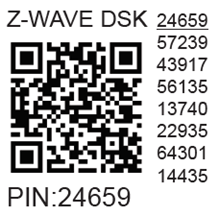
The first five digits of the key are highlighted or underlined to help the user identify the PIN Code part of the DSK text. The DSK is additionally represented with a QR Code as shown on the image.
Z-Wave® DSK label and QR code (example)
A joining node requesting to join the S2 Access Control Class or the S2 Authenticated Class will obfuscate its Public Key by setting the bytes 1..2 to zeros (0x00) before transferring its key via RF.
The DSK may be used for out-of-band (OOB) authentication.
-
The including gateway may use a QR code scanning device to read the entire DSK of the joining device and match it with the obfuscated public key received via RF from the joining device.
Setting Parameters
Z-Wave® Command Classes
Z-Wave® Notifications Command Class
Z-Wave® Associations
Disclaimers and Warnings
READ BEFORE USE
This document contains important technical and safety information about the Device, its safe use and installation.
Z-Wave® Important disclaimer
Z-Wave® wireless communication may not always be 100% reliable. This Device should not be used in situations in which life and/or valuables are solely dependent on its functioning. If the Device is not recognized by your gateway or appears incorrectly, you may need to change the Device type manually and ensure that your gateway supports Z-Wave Plus™ multi-level devices.
Compatibility
| Wave PRO Dimmer 2PM | functions - reports | ||||||||||||
| Gateway | Dimming 1 | Dimming 3 | SW Dimming 1 | SW Dimming 3 | D Control 1 | D Control 2 | D Control 3 | D Control 4 | D Binary 1 | D Binary2 | D Binary 3 | D Binary 4 | Notes |
| Home Assistant | | | | | | | | | | | | | |
| Fibaro - HC 3 / Wave engine 3 | | | | | | | | | | | | | |
| Homey | | | | | ❌ | ❌ | ❌ | ❌ | | | | | *H |
| Homee Gen 7 | | | | | | | ❌ | ❌ | | | | | *1 |
| Homee Gen 5 | P *2 | P *2 | P *2 | P *2 | ❌ | ❌ | ❌ | ❌ | TBD | TBD | TBD | TBD | *2 |
| Smart Things | | | | | ❌ | ❌ | ❌ | ❌ | ❌ | ❌ | ❌ | ❌ | *3 |
| Vera Ezlo | | | | | ❌ | ❌ | ❌ | ❌ | ❌ | ❌ | ❌ | ❌ | *3 |
| Cozify | TBD | TBD | TBD | TBD | TBD | TBD | TBD | TBD | TBD | TBD | TBD | TBD | |
| Notes | *H Troubles with reports can be solved with this solution. The central scene is not supported. | ||||||||||||
| Function | Meaning / tested |
|---|---|
| On/Off | if device respond to the app UI On/Off command |
| SW On/Off | if device reports On/Off changes by SW input |
| Dimming | if device respond to app UI dimming command |
| SW Dimming | if device report dimming state change by SW input |
| Watts | if Watts are reported (unsolicited) |
| kWh | if kWh are reported (unsolicited) |
| Up/Down | if device respond to the app UI Up/Down command |
| SW Up/Down | if device reports Up/Down changes by SW input |
| Slats | if the slats respond to the app UI command |
| SW Slats | if the slats report the changes done by SW |
| D control | detached mode if device reports scene commands single press, double press,… |
| D Binary | detached mode if the device reports binary On/Off by SW input |
| Sensor # | Is the sensor report visualized in the gateway, type of sensor in the notes. |
| Legend | ||||
| Symbol | State | |||
| | Working / Possible | |||
| ❌ | Not Working / Not Possible | |||
| P | Partially | |||
| N/T | Not Tested | |||
| TBD | To be done | |||
FCC Notes
This Device complies with Part 15 of the FCC Rules.Operation is subject to the following two conditions: (1) this device may not cause harmful interference, and (2) this device must accept any interference received, including interference that may cause undesired operation.The manufacturer is not responsible for any radio or TV interference caused by unauthorized modification or change to this equipment. Such modifications or change could void the user’s authority to operate the equipment.This equipment has been tested and found to comply with the limits for a Class B digital device, pursuant to part 15 of the FCC Rules. These limits are designed to provide reasonable protection against harmful interference in a residential installation. This equipment generates, uses and can radiate radio frequency energy and, if not installed and used in accordance with the instructions, may cause harmful interference to radio communications. However, there is no guarantee that interference will not occur in a particular installation. If this equipment does cause harmful interference to radio or television reception, which can be determined by turning the equipment off and on, the user is encouraged to try to correct the interference by one or more of the following measures:Reorient or relocate the receiving antenna.Increase the separation between the equipment and receiver.Connect the equipment into an outlet on a circuit different from that to which the receiver is connected.Consult the dealer or an experienced radio/TV technician for help.RF exposure statement:This equipment complies with FCC radiation exposure limits set forth for an uncontrolled environment. The device has been evaluated to meet general RF exposure requirement. The device can be used in portable exposure condition without restriction. 
Disposal & Recycling
This refers to the waste of electrical and electronic equipment. It is applicable in the US and other countries to collect waste separately.

This symbol on the product or in the accompanying literature indicates that the product should not be disposed of in the daily waste. Shelly Wave Pro Dimmer 2PM must be recycled to avoid possible damage to the environment or human health from uncontrolled waste disposal and to promote the reuse of materials and resources. It is your responsibility to dispose of the device separately from general household waste when it is already unusable.
Web links:
Troubleshooting
Gateway guides
You may find useful guides on gateways in the Z-Wave Z-Wave Gateways
Firmware
Latest firmware updates:
Stay Updated with the Firmware Releases for Shelly Wave Devices
all firmware updates:
GitHub - Shelly Wave FW OTA files
Integration
All shelly devices:
Discover Compatible Gateways for our Devices
Webpages
Product page
Printed User Guide
Manufacturer
Shelly Europe Ltd.
Address: Shelly Europe ltd, 51 Cherni Vrah Blvd., building 3, floor 2 and 3, Lozenetz Region, Sofia 1407, Republic of Bulgaria
Tel.: +359 2 988 7435
E-mail: zwave-shelly@shelly.cloud
Support: https://support.shelly.cloud/
Changes in the contact data are published by the Manufacturer at the official website: https://www.shelly.com
Legal Notice
This User Guide is subject to change and improvement without notice. Shelly Wave reserves all rights to revise and update all documentation without any obligation to notify any individual or entity.