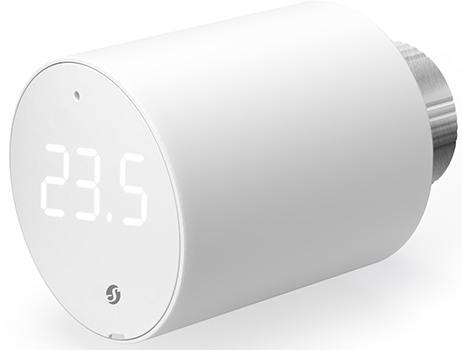
Ein smartes Thermostatventil für Heizkörper, das eine präzise Raumtemperaturregelung und eine verbesserte Heizeffizienz ermöglicht und sich mühelos in Dein Heizsystem integriert.
*Ein Gateway wird benötigt und ist im Lieferumfang enthalten
2
2 Jahre Garantie
2 Jahre Garantie
Diese Garantie deckt alle Probleme mit der Hardware oder Firmware ab, die zum Zeitpunkt des Kaufs vorhanden sind oder innerhalb der Garantiezeit auftreten. Die Garantie umfasst alle Teile der Hardware, wie Gehäuse, Mechanik und Display (falls zutreffend). Verbrauchsartikel wie Batterien oder Zubehör sind jedoch nicht abgedeckt, da deren Lebensdauer von der Häufigkeit ihrer Nutzung abhängt.
Mehr erfahren
Tür- und Fensteröffnungssensor, der mit dem Shelly TRV kombiniert werden kann, um eine erweiterte Heizungssteuerung einzurichten.
Normaler Preis
16,66 €
Verkaufspreis
16,66 €
Normaler Preis
Grundpreis/ pro
Erkennt und meldet das Öffnen oder Schließen von Türen/Fenstern sofort, löst dann entsprechende Hausautomatisierungsszenarien aus. Kann auch den Neigungswinkel und die Helligkeit messen.
Erkennung offener Türen/Fenster
Tür- und Fensteröffnungssensor, der mit dem Shelly TRV kombiniert werden kann, um eine erweiterte Heizungssteuerung einzurichten.
Verfügbarkeit für Abholungen konnte nicht geladen werden
Hauptmerkmale
New: Zigbee-Unterstützung per FW-Update (1.3.2)
Bluetooth-betrieben und WLAN-fähig mit Gateway (im Lieferumfang enthalten)
2x 1,5 V Batterie AA (im Lieferumfang enthalten)
Präzise Temperaturregelung (Anpassung um ±0,1 °C)
Boost-Modus für schnelles Aufheizen des Raums
Smarte Zeitpläne: Tägliche Heizpläne zur Reduzierung des Energieverbrauchs
Zwei Betriebsmodi: Unterstützung von temperaturbasierter Regelung (TRV-Modus) und manueller Ventilsteuerung (%) für ein flexibles Heizmanagement
Das Gateway kann an jede USB-Stromversorgung, jedes Ladegerät oder jedes Gerät mit USB-A-Anschluss angeschlossen werden (Leistungsaufnahme über 5 W)
Shelly BLU TRV
Device identification
Device name: Shelly BLU TRV
Device model: SBTR-001AEU
Device Bluetooth ID: 0x0008
Short description
Shelly BLU TRV is a smart thermostatic radiator head with Bluetooth and Zigbee connectivity, offering control over Wi-Fi using the BLU Gateway Gen3. It controls the temperature of a room by changing the flow of the hot water through the radiator. If needed, the temperature can be changed at any time by turning the Device rotating knob to the left or right, or through your mobile phone, tablet, or PC. The Device can also maintain the room temperature according to a set weekly schedule. It is powered by 2 AA, 1.5 V batteries.
External sensor support (compatible with Shelly BLU H&T, BLU H&T ZB, BLU H&T Display ZB, Shelly BLU Door/Window sensors, associated via BLU Gateway Gen3)
Integration with most smart home systems
Use cases
Remote temperature control: Make sure that your home is warm upon arrival and save energy by not heating the home unnecessarily when it is not occupied.
Smart scheduling for energy efficiency: Set up smart schedules in the cloud application to optimize your heating schedule and save on energy costs.
Boost mode for rapid heating: Activate Boost mode locally via the rotary encoder, or remotely through the cloud. This mode fully opens the valve to rapidly reach a comfortable temperature.
Room-by-room temperature control: Manage the temperature independently for each room. Achieve personalized comfort and improved energy efficiency by heating rooms according to their specific use.
Adaptive learning for personalized heating: Adjust your heating system for optimal comfort and safety using data from external sensors, such as Shelly BLU H&T and Shelly BLU Door/Window.
Connectivity
Bluetooth
Zigbee
User interface
Inputs
User (reset) button
Press once to activate Bluetooth pairing mode
Press 3 times to activate Zigbee network association
Press and hold for 30 seconds to factory reset the Device
Press 5 times to activate Find and Bind
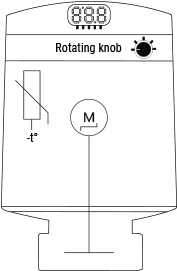
Rotating knob
Turn at least 1 step clockwise (CW) or counterclockwise (CCW) to activate the LEDs.
Turn the knob in quick short movements for less tan 10 steps CCW > CW > CCW> CW (start in either direction) to access the TRV user menu. The menu starts with a battery level indication
Turn 4 steps CW to activate the Bluetooth pairing mode (active 30 seconds)
Turn 5 steps CW to activate Zigbee network association (active 30 seconds)
Turn 1 step CW to increase temperature with 0.1 °C
Turn 1 step CCW to decrease temperature with 0.1 °C
Turn the knob quickly for more than 10 steps CW to turn on Boost mode
Turn the knob quickly for more than 10 steps CCW to turn off Boost mode
Outputs
3-digit, 7-segment LED display:
Mounting
TRV head not mounted on the backplate
Calibration
Calibration in progress Calibration passed Calibration failed
Temperature setting
Temperature setting in progress
Confirming the set temperature
Bluetooth pairing (active 30 seconds) Number of paired BLE devices No paired BLE devices Result of pairing/association Result of pairing/association
Zigbee network association (active 30 seconds) Zigbee network status Zigbee network status - associated Zigbee network lost Zigbee identifying
User menu
Battery level (default entry) Number of paired BLE devices (1 step CW) Zigbee network status (2 steps CW) Number of errors (3 steps CW) Bluetooth pairing (4 steps CW)
Zigbee pairing/association (5 steps CW)
Prompt to exit user menu (6 steps CW)
Updates
Over-the-air update in progress
Errors
No errors Number of errors
Calibration error
Insufficient voltage or current output. Change batteries
Supported valves
Without adapter
M30 x 1.5
With supplied adapter
Danfos
RA
RAV
RAVL
Caleffi
Giacomini
M28 x 1.5
Sam
Slovarm
Comap
Markardys
TA
Herz
MMA
Remagg
Pont a Mousson
With third-party adapter
Gampper (27 mm thread and inner thread M22)
Glacomini
Ista
Meges (M38 x 1.5)
Ondal (M38 x 1.5)
Oventrop (M30 x 1.0 with 4 prongs)
Rossweiner (M33 x 2.0)
Vallant (30.5 mm)
View the full list of valves and their compatibility:
Up to 10 m / 33 ft indoors and 30 m / 100 ft outdoors (depends on local conditions)
Zigbee
Protocol:
802.15.4
RF bands:
2405 to 2480 MHz
Max. RF power:
< 8 dBm
Range:
Up to 10 m / 33 ft indoors and 30 m / 100 ft outdoors (depends on local conditions)
Firmware capabilities
Schedules:
Yes
FAQ
When should I use the Underfloor heating functionality?
A1: When the Device is not mounted on a radiator but controls underfloor heating. A2: When the room is too large for the radiator to distribute and maintain heat evenly. A3: When there is poor air circulation around the radiator.
When should I not use Underfloor heating functionality?
A1: When the external sensor readings are not reliable. A2: When maintaining temperature is crucial.
Troubleshooting
Problem
Possible cause
Solution
The Shelly BLU TRV has lost its connection to the Zigbee coordinator.
The device has likely been unable to reach the Zigbee coordinator for an extended period.
When the network connection is lost, the BLU TRV automatically tries to reconnect following this schedule:
First 12 hours - retries every 60 minutes
Next 24 hours - retries every 6 hours
Next 7 days - retries every 24 hours
After that, retry attempts stop until the BLU TRV is rebooted
Select ZbE from the TRV menu using the BLU TRV display to initiate a reconnection
Reboot the Shelly BLU TRV to restart the automatic reconnection retry cycle
The Shelly BLU TRV displays significantly incorrect temperature readings compared to the actual room temperature.
The Shelly BLU TRV expects data from an external temperature sensor and doesn't revert to its default measurement.
Run the external temperature command without parameters: http:///rpc/blutrv.call?id=&method=Trv.SetExternalTemperature¶ms={"id":0}
Shelly BLU TRV is unresponsive during the firmware update.
The update does not complete successfully, causing the Device to enter Bootloader mode.
Perform a manual update using the Shelly Debug BLE Devices application:
We recommend using an Android smartphone for best results.
We recommend using new batteries for the update.
Before you begin, remove the Device from your smartphone’s Bluetooth settings by selecting Forget.
Open the Shelly Debug app.
Press and hold Reset button of the Device.
While holding the button, insert the new batteries and close the battery compartment. The Device will appear in the app’s Device list for about 40 seconds.
Select the Device from the list.
Start the OTA update.
The Device is paired to an external sensor. The Device shows a temperature above the target, but the valve remains open.
Underfloor Heating mode is not enabled. In this case, the Device might receive a higher temperature reading from the paired external sensor, which it uses to adjust (correct) its internal temperature measurement. Therefore, valve control is based on this corrected internal temperature rather than directly on the external sensor's reading.
This behavior is normal. Enable Underfloor Heating mode if you prefer the Device to rely exclusively on data from the external sensor, ignoring the built-in sensor.
The Device senses a quick drop in temperature and opens the valve early to keep the temperature from going below the target.
This behavior is normal and is part of the normal operation of the algorithm.
The radiator heats unevenly, causing the Device's temperature to be lower than expected.
Ensure proper water flow in the radiator by bleeding it.
Underfloor heating is enabled, but the device is not receiving updated temperature values. The gateway might be too far away, preventing the Device from receiving the latest external temperature reading.
Move the gateway closer to the Device to improve communication.
The temperature increases when the algorithm is changed via the power_save flag.
Applicable for FW version ≥1.2.0
The BLU TRV adjusts its current temperature reading based on radiator heat. Changing the algorithm or updating the firmware might reset these adjustments. The Device needs time to recalculate.
The BLU TRV will automatically adapt and gradually adjust its temperature readings.
The Device cannot fully close the valve even when the temperature is set to the minimum. The issue persists after successful calibration.
The plunger is a bit shorter than required to close your valve.
Attach a small metal disk, (approx. the size of a 1 Euro cent coin), to the black plunger tip to extend its travel.
The Device cannot take readings from an external temperature sensor to set the target temperature.
Underfloor Heating feature not enabled through the Shelly Smart Control app or the web interface of the Gateway Gen3.
Temperature sensing behavior with an external BLU H&T sensor paired with the TRV
If Underfloor Heating is enabled: The TRV uses data only from the external sensor disregarding the built-in sensor.
If Underfloor Heating is disabled: The TRV uses data from the external BLU H&T to correct the built-in sensor.
Enable the Underfloor Heating feature:
Login to the Shelly Smart Control app or access the Gateway Gen3 web interface.
Select the TRV you want to configure.
Go to Settings>TRV Behavior.
Enable the Underfloor heating feature.
The Device’s valve appears to be open, even though it is set to.
Brauche ich ein Gateway, um das Gerät zu verwenden?
Der Shelly BLU TRV kann nicht mit anderen Shelly Geräten gekoppelt werden. Es funktioniert ausschließlich mit dem enthaltenen USB Gateway Gen3 (Shelly BLU Gateway Gen3 - https://kb.shelly.cloud/knowledge-base/shelly-blu-gateway-gen3). Es können bis zu fünf TRVs mit einem Gateway verbunden werden.
Ist es möglich, das Gerät ohne Hub zu verwenden?
Ja, Shelly Geräte (außer den Wave-Geräten) arbeiten eigenständig, ohne dass ein Hub benötigt wird. Sie verbinden sich direkt mit Deinem WLAN, und Du kannst sie über die Shelly Smart Control App, das Webinterface oder über Integrationen mit Plattformen wie Google Home, Alexa, Home Assistant und Samsung SmartThings steuern.
Der Shelly BLU TRV bietet präzise Temperaturregelung: Dein gewünschtes Komfortniveau wird mit einer Genauigkeit von ±0,1°C aufrechterhalten und Du wirst eine durchgehend gleichbleibend angenehme Umgebung genießen. Dir ist kalt und Du brauchst es schnell wärmer? Der Boost-Modus bringt ein Zimmer im Handumdrehen auf die ideale Temperatur.
Indivduelle Heizsteuerung leicht gemacht
Indivduelle Heizsteuerung leicht gemacht
Optimiere sowohl Komfort als auch Energieeffizienz: Mit smarten Zeitplänen kannst Du Deine Heizung an Deine täglichen Routinen anpassen. Für eine noch genauere Temperaturregelung unterstützt das Shelly BLU TRV externe Sensoren wie den Shelly BLU H&T und den Shelly BLU Door-/Window. Das macht ihn zu einer vielseitigen Ergänzung für jedes Heizungssystem.
Komfort und Effizienz perfekt kombiniert
Komfort und Effizienz perfekt kombiniert
Sorge für ein Zuhause, das Dich direkt bei Deiner Ankunft wohlig warm empfängt und vermeide dabei unnötigen Energieverbrauch. Mit unserer App kannst Du ganz einfach smarte Heizpläne erstellen, die sich nach Deiner täglichen Routine richten: Du sparst Stromkosten, weil Dein Zuhause wirklich nur bei Bedarf angenehm warm ist.
WARUM SHELLY BLU TRV?
Präzise Steuerung Deiner Heizkörper
Erlebe unvergleichlichen Komfort und Effizienz mit dem smarten Thermostatventil von Shelly. Der Shelly BLU TRV wurde so konzipiert, dass er sich perfekt in Dein Interieur einfügt, und bietet eine präzise Klimaregelung, damit Dein Raum immer die ideale Temperatur hat. Bluetooth-betrieben, WLAN-fähig und mit Zigbee-Unterstützung sorgt er für schnelle Reaktionszeiten, eine lange Batterielaufzeit und eine einfache Einbindung in Smart-Home-Systeme.
Multiprotokoll-Konnektivität
Verbindung über Bluetooth und Zigbee oder Nutzung von WLAN mit dem mitgelieferten Gateway für schnellere Reaktionszeiten und eine einfache Einbindung.
Präzise Temperaturregelung: ±0,1 °C
Feinjustierung der Temperatur in Schritten von ±0,1 °C für ein angenehmes und ausgewogenes Raumklima.
Boost-Modus
Aktiviere den Boost-Modus, um den Raum schneller aufzuheizen, wenn kurzfristig Wärme benötigt wird.
Drehbares Display mit Ziffernanzeige
Temperatur klar ablesen und direkt am Gerät anpassen, wenn Du zu Hause bist.
Langlebige Batterien
Lege die mitgelieferten AA-Batterien ein und nutze das Gerät bis zu zwei Jahre, je nach täglicher Nutzung.
Unterstützung externer Sensoren
Kopple das Ventil mit kompatiblen Temperatur-, Feuchtigkeits- oder Tür- und Fenstersensoren, um die Heizgenauigkeit anhand der Raumbedingungen weiter zu verbessern.
SOLUTIONS
Shelly BLU TRV 2-pack
Ein neuer Standard für bequemes Wohnen
Ein neuer Standard für bequemes Wohnen
Der Shelly BLU TRV bietet präzise Temperaturregelung: Dein gewünschtes Komfortniveau wird mit einer Genauigkeit von ±0,1°C aufrechterhalten und Du wirst eine durchgehend gleichbleibend angenehme Umgebung genießen. Dir ist kalt und Du brauchst es schnell wärmer? Der Boost-Modus bringt ein Zimmer im Handumdrehen auf die ideale Temperatur.
Indivduelle Heizsteuerung leicht gemacht
Indivduelle Heizsteuerung leicht gemacht
Optimiere sowohl Komfort als auch Energieeffizienz: Mit smarten Zeitplänen kannst Du Deine Heizung an Deine täglichen Routinen anpassen. Für eine noch genauere Temperaturregelung unterstützt das Shelly BLU TRV externe Sensoren wie den Shelly BLU H&T und den Shelly BLU Door-/Window. Das macht ihn zu einer vielseitigen Ergänzung für jedes Heizungssystem.
Komfort und Effizienz perfekt kombiniert
Komfort und Effizienz perfekt kombiniert
Sorge für ein Zuhause, das Dich direkt bei Deiner Ankunft wohlig warm empfängt und vermeide dabei unnötigen Energieverbrauch. Mit unserer App kannst Du ganz einfach smarte Heizpläne erstellen, die sich nach Deiner täglichen Routine richten: Du sparst Stromkosten, weil Dein Zuhause wirklich nur bei Bedarf angenehm warm ist.
Update Not possible, it doen‘t work after trying an update.
S
S.P.
Review
Review content
P
P.
Not the best shelly product, by far
I am a huge Shelly fan, but those radiator valves are not great.
1) Bad network connectivity, quite often
2) Insufficient strength of motor, leading to frequent decalibrations
Lade unsere kostenlose App herunter, um Räume zu verwalten, den Energieverbrauch zu überwachen und Ausgaben zu verfolgen. Upgrade auf Premium für noch mehr Funktionen!
Wenn Du Dich für eine Auswahl entscheidest, wird die Seite komplett aktualisiert.