Ignorer et passer au contenu
-
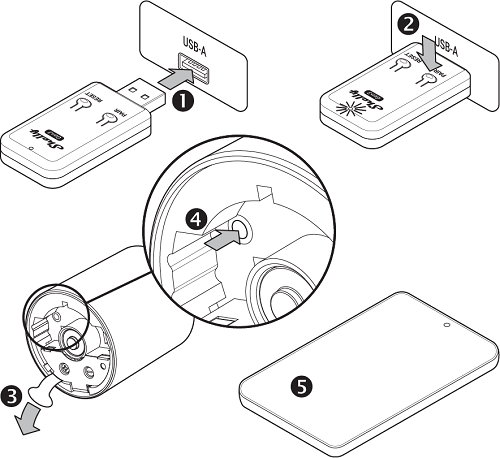
Insert Shelly BLU Gateway Gen3 into a standard USB-A port.
-
Press the Pairing button on the gateway.
-
Within the next 30 seconds, remove the isolation tab from the battery compartment of the Shelly BLU TRV.
-
Press its Reset button on the Shelly BLU TRV. The display begins to flash  .
.
-
Add Shelly BLU Gateway Gen3 to Shelly Smart Control by following the app’s instructions.
- Le choix d'une sélection entraîne l'actualisation de la page entière.
- S'ouvre dans une nouvelle fenêtre.
{"statementLink":"","footerHtml":"","hideMobile":false,"hideTrigger":false,"disableBgProcess":false,"language":"en","position":"left","leadColor":"#146ff8","triggerColor":"#146ff8","triggerRadius":"50%","triggerPositionX":"right","triggerPositionY":"bottom","triggerIcon":"people","triggerSize":"medium","triggerOffsetX":20,"triggerOffsetY":20,"mobile":{"triggerSize":"small","triggerPositionX":"right","triggerPositionY":"bottom","triggerOffsetX":10,"triggerOffsetY":10,"triggerRadius":"50%"}}