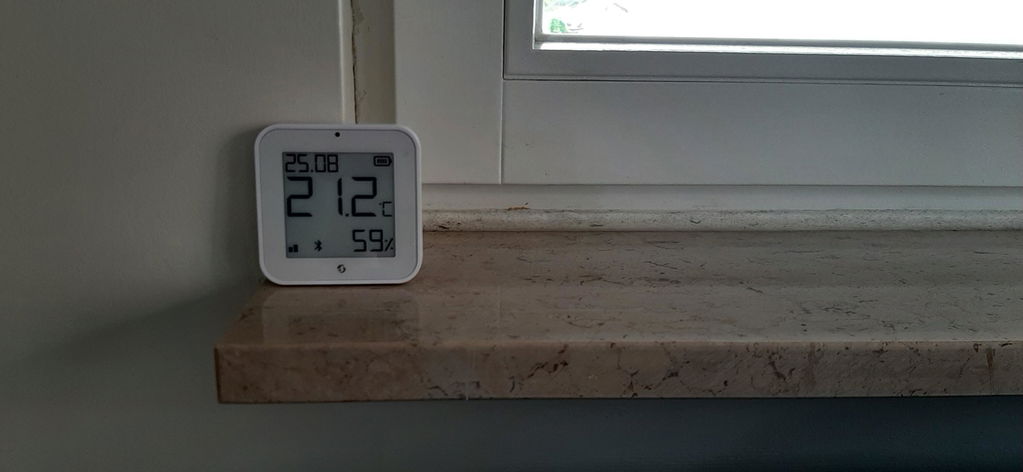
Device image
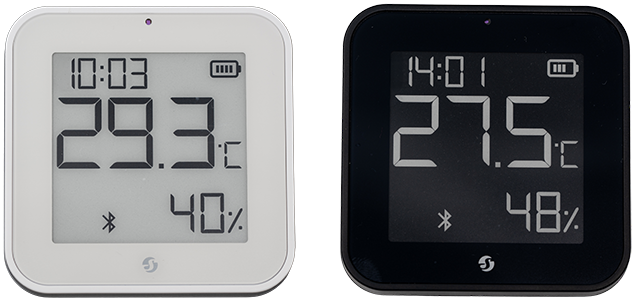
Device identification
-
Device name: Shelly BLU H&T Display ZB
-
Device model: SBHT-103C
-
Device Bluetooth ID: 0x000C
Short description
Shelly BLU H&T Display ZB is a battery-powered sensor featuring a crisp e-paper display that shows real-time temperature, humidity, light levels, and a digital clock - all in one compact unit.
Designed to blend into any space, the Device comes with a stand for tabletop use and can also be mounted on a wall or other vertical surface. Whether placed in your living room, nursery, or office, it gives you instant insight into indoor conditions.
With Zigbee 3.0 and Bluetooth 5.0 support, it pairs seamlessly with your smart home system and ensures reliable performance for comfort automation and energy savings.
Main features
-
Real-time temperature, humidity, and light level monitoring
-
Clear and energy-efficient e-paper graphic display with color inversion option
-
Built-in digital clock for added convenience
-
Battery-powered for flexible placement and long-lasting operation
-
Power save mode to stop screen refresh in complete darkness, preserving battery life while still reporting data
-
Automatic clock synchronization over Bluetooth (via selected Shelly Bluetooth gateways) and Zigbee for accurate timekeeping.
-
Dual wireless support with Zigbee 3.0 and Bluetooth 5.0
-
Comes with a tabletop and wall stands for versatile setup
-
Embedded rear magnets for easy attachment to metal surfaces or wall stand
-
Perfect for homes, offices, or any indoor space
-
Seamless integration with Shelly smart devices and third-party platforms
Use cases
-
Monitor Room Conditions at a Glance
Place the BLU H&T Display ZB in your living room, bedroom, or office to track real-time temperature, humidity, and brightness levels -
Ensure Comfort in Nurseries and Bedrooms
Keep an eye on the environment where comfort matters most. Use the display to make sure the temperature and humidity stay within optimal levels for sleep and wellness. -
Smart Lighting and HVAC Automation
Combine with other Shelly devices to automate lighting and heating based on the room’s light level, temperature, or humidity readings. -
Optimize Energy Usage in Your Home
Use real-time environmental data to reduce energy waste - automate blinds, fans, or heaters only when needed based on actual room conditions. -
Keep a Cozy Atmosphere All Day
Use the lux sensor to track changing natural light throughout the day and adjust indoor lighting for comfort, mood, or relaxation without over-lighting the space.
Main applications
-
Residential
-
MDU (Multi Dwelling Units - apartments, condominiums, hotels, etc.)…
-
Light commercial (small office buildings, small retail/restaurant/gas station, etc.)…
-
Government/municipal
-
University/college
Integrations
Amazon Alexa supported capabilities
-
Temperature Sensor
Google Smart Home supported traits
-
Humidity Setting
-
Temperature Control (status report)
Samsung SmartThings supported capabilities
-
Relative Humidity Measurement
-
Temperature Measurement
Connectivity
-
Bluetooth
-
Zigbee
User interface
Inputs
-
Single Button
-
Press 1 time: Enter setup mode for 3 minutes.
-
Press 1 time: Exit setup mode.
-
Press 2 times rapidly: Force clock synchronization via a Shelly device set as a Bluetooth gateway.
-
Press 4 times rapidly: Enter Bluetooth pairing mode.
-
Press 5 times rapidly: Enter Zigbee pairing mode.
-
Press and hold for 5 seconds: Toggle Bluetooth on/off.
-
Press and hold for 10 seconds: Toggle Zigbee on/off.
-
Press and hold for 30 seconds: Resets the device to factory settings.
-
-
Press 2 times rapidly: Toggle the clock display segment between showing the clock or the date.
-
Press 3 times rapidly: Switch temperature unit between Celsius and Fahrenheit. When Celsius is selected, the date format is DD.MM; when Fahrenheit is selected, the date format is MM.DD.
-
Press 4 times rapidly: Invert the display colors.
-
Press 5 times rapidly: Toggle the clock format between 24-hour and 12-hour.
-
Outputs
-
E-paper graphic display
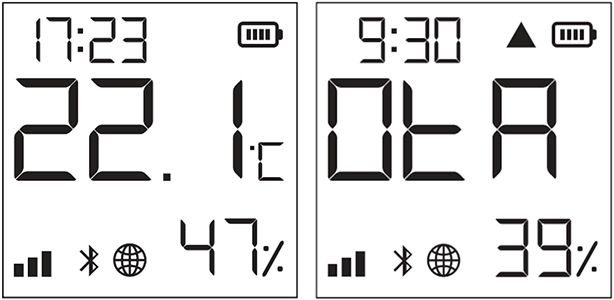
| | Current time |
| | The Device is in Setup mode. |
| | Bluetooth pairing is enabled |
| | Zigbee pairing is enabled |
| | Zigbee identify |
| | Clock is syncing |
| | Clock sync failed |
| | Humidity readings |
| | Indicates light sensor level (3 levels). |
| | 3 bars - Bright light |
| | 2 bars - Twilight |
| | 1 bar - Dark |
| | No bars – Battery Saver is ON. Screen updates are paused, but wireless reporting continues. Displayed data may be outdated. |
| | Indicates battery level |
| | Bluetooth connectivity is enabled |
| | Zigbee connectivity is enabled |
| | Over-the-air update is in progress. The display shows the update progress percentage instead of the humidity. |
 | Error while updating the firmware |


Specifications
| Quantity | Value |
|---|---|
| Physical | |
| Size (HxWxD): |
|
| Weight: |
|
| Mounting: |
|
| Shell material: | Plastic |
| Shell color: |
|
| Screen protector: | Yes, pre-applied |
| Environmental | |
| Ambient working temperature: | -10°C to 40°C / 14°F to 105°F |
| Humidity: | 30% to 70% RH |
| Max. altitude: | 2000 m / 6562 ft |
| Electrical | |
| Power supply: | Batteries |
| Battery type: | 2 x CR2032 |
| Estimated battery life: | Approx. 2 years (depending on batteries used, device usage, and network connection strength) |
| Sensors, meters | |
| Temperature sensor: | Yes |
| Humidity sensor: | Yes |
| Light sensor: | Yes |
| Radio | |
| Bluetooth | |
| Protocol: | 5 (LE) |
| RF band: | 2402 - 2480 MHz |
| Max. RF power: | < 8 dBm |
| Range: | Up to 10 m / 33 ft indoors and 30 m / 100 ft outdoors |
| Zigbee | |
| Protocol: | 802.15.4 |
| RF band: | 2405 to 2480 MHz |
| Max. RF power: | < 8 dBm |
| Range: | Up to 10 m / 33 ft indoors and 30 m / 100 ft outdoors |
| Microcontroller unit | |
| CPU: | EFR32MG27 |
| Flash: | 768 kB |
| Firmware capabilities | |
| Schedules: | No |
| Webhooks (URL actions): | No |
| Scripting: | No |
| MQTT: | No |
Q&A
Components and APIs
-
This device
Compliance
-
BLU H&T Display ZB multilingual EU declaration of conformity 256 2025-12-18.pdf
-
BLU H&T Display ZB UK PSTI ACT statement of compliance 256 2025-12-18.pdf
-
BLU H&T Display ZB UKCA declaration of conformity 256 2025-12-18.pdf
Printed User Guide